# Kubernetes Resources
# Pod

##### Useful Links:
- [Kubernetes Official Documentation](https://kubernetes.io/docs/concepts/workloads/pods/)
- [Viewing Pods and Nodes](https://kubernetes.io/docs/tutorials/kubernetes-basics/explore/explore-intro/)
##### Architecture:
##### Detailed Description:
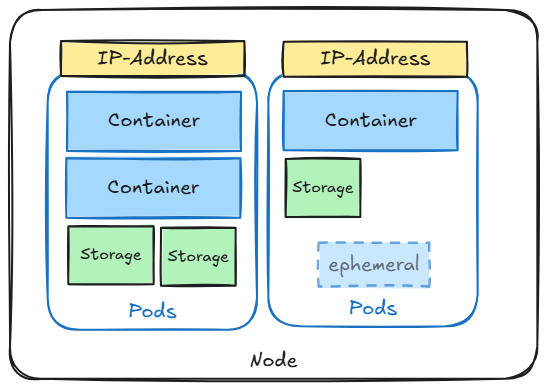
A Pod is the smallest deployable unit in Kubernetes and serves as the basic building block for running applications in the cluster. Each Pod encapsulates one or more containers, which share the same resources such as storage, networking, and compute. Containers within a Pod are tightly coupled, meaning they always run together on the same node and share the same network namespace, allowing them to communicate with each other using `localhost`.
Typically, a Pod has a single container, but it can host sidecar containers that assist the main application container with additional tasks like logging, monitoring, or proxying requests. Pods are ephemeral by nature, designed to be replaceable and scaled according to workload demands through higher-level Kubernetes abstractions like Deployments or StatefulSets.
Key characteristics of Pods include:
- **Shared Networking:** All containers in a Pod share the same IP address and port space.
- **Shared Storage:** Volumes attached to a Pod are shared among all its containers.
- **Lifecycle Management:** Pods are managed by controllers like Deployments, ReplicaSets, and DaemonSets to ensure desired state is maintained.
**```Init containers```** in Kubernetes run before the main app container starts in a pod.
- Prepare the environment (e.g., set up files or check conditions)
- Run once and finish before the main app starts
- Are useful for tasks that your main app doesn't handle well or should not have access to
**```Sidecar containers```** run alongside the app container in a pod to enhance its functionality without modifying the main app. They can share resources and help with tasks like logging, monitoring, or proxying.
**```Ephemeral containers```** are temporary containers that you can add to an existing Pod to troubleshoot or inspect it. Unlike regular containers, they are not part of the initial setup and cannot be restarted. They’re useful when you need to debug or run commands in a Pod that’s already running.
##### Command Reference Guide:
```bash
# Query running pods
kubectl get pods
# Query detailed informatoin about pods
kubectl get pods -o wide
# Create single pod
kubectl run nginx --image=nginx
# Run image / pass environment and command
kubectl run --image=ubuntu ubuntu --env="KEY=VALUE" -- sleep infinity
# Get yaml configuration for the resource
kubectl run nginx --image=nginx --dry-run=client -o yaml | tee nginx.yaml
# Get specific information of any yaml section
kubectl explain pod.spec.restartPolicy
# Create pod resource from yaml configuration file
kubectl create -f nginx.yaml
# Apply pod resource from yaml configuration
kubectl apply -f nginx.yaml
# Delete pod resource wihtout waiting for graceful shutdown of application (--now)
kubectl delete pod/nginx pod/ubuntu --now
# Get full resource description using descripe
kubectl describe pod/nginx
# Get logs for a specific container in the pod
kubectl logs pod/nginx -c nginx
# If a pod fails use -p to get previouse logs for a specific container in the pod
kubectl logs pod/nginx -c nginx -p
# Get shell from running container
kubectl exec --stdin --tty nginx -- /bin/bash
kubectl exec --stdin --tty nginx -c container1 -- /bin/bash # get access to specific container
# Combine pod creation
kubectl run nginx --image=nginx --dry-run=client -o yaml | tee nginx.yaml
kubectl run ubuntu --image=ubuntu --dry-run=client -o yaml | tee ubuntu.yaml
{ cat nginx.yaml; echo "---"; cat ubuntu.yaml; } | tee multi_pods.yaml
kubectl apply -f multi_pods.yaml
```
fail-pod-deploy.yaml:
```yml
apiVersion: v1
kind: Pod
metadata:
name: blocked-pod
spec:
restartPolicy: Never
initContainers:
- name: init-fail
image: busybox
command: ["sh", "-c", "exit 1"]
containers:
- name: app-container
image: nginx
```
success-on-retry-pod-deploy.yaml:
```yaml
apiVersion: v1
kind: Pod
metadata:
name: blocked-pod
spec:
restartPolicy: Always
initContainers:
- name: init-fail
image: busybox
command: ["sh", "-c", "if [ ! -f /data/ready ]; then touch /data/ready; sleep 10; exit 1; else exit 0; fi"]
volumeMounts:
- name: shared-data
mountPath: /data
containers:
- name: app-container
image: nginx
volumeMounts:
- name: shared-data
mountPath: /data
volumes:
- name: shared-data
emptyDir: {}
```
sidecar-pod-deploy.yaml:
```yaml
apiVersion: apps/v1
kind: Deployment
metadata:
name: myapp
labels:
app: myapp
spec:
replicas: 1
selector:
matchLabels:
app: myapp
template:
metadata:
labels:
app: myapp
spec:
containers:
- name: myapp
image: alpine:latest
command: ['sh', '-c', 'while true; do echo "$(date) logging $(($RANDOM))" >> /opt/logs.txt; sleep 5; done']
volumeMounts:
- name: data
mountPath: /opt
- name: logshipper
image: alpine:latest
command: ['sh', '-c', 'tail -F /opt/logs.txt']
volumeMounts:
- name: data
mountPath: /opt
volumes:
- name: data
emptyDir: {}
```
```bash
# Create init container that will fail. App container will not start
kubectl apply -f fail-pod-deploy.yaml && watch kubectl describe -f blocked.yaml
# Create init container that will succed on second try.
kubectl apply -f success-on-retry-pod-deploy.yaml && watch kubectl describe -f blocked.yaml
# Run app container along with sidecar helper container
kubectl apply -f sidecar-pod-deploy.yaml && watch kubectl logs $(kubectl get pods -l app=myapp -o jsonpath='{.items[0].metadata.name}') --all-containers=true
# Run ephemeral container (If you only need to inspect and debug the running Pod)
kubectl run ephemeral-demo --image=busybox --restart=Never -- sleep 100000
kubectl debug -it ephemeral-demo --image=busybox:1.28 --target=ephemeral-demo
kubectl describe pod ephemeral-demo
# Copy and Add a New Container (If you need to change the environment or add more debugging tools)
kubectl run myapp --image=busybox:1.28 --restart=Never -- sleep 1d
kubectl debug myapp -it --image=ubuntu --share-processes --copy-to=myapp-debug
kubectl get pods
```
# Namespace

##### ****Useful Links****
- [Kubernetes Official Documentation](https://kubernetes.io/docs/concepts/overview/working-with-objects/namespaces/)
- [Namespaces Walkthrough](https://kubernetes.io/docs/tasks/administer-cluster/namespaces-walkthrough/)
##### ****Architecture****
##### ****Detailed Description****
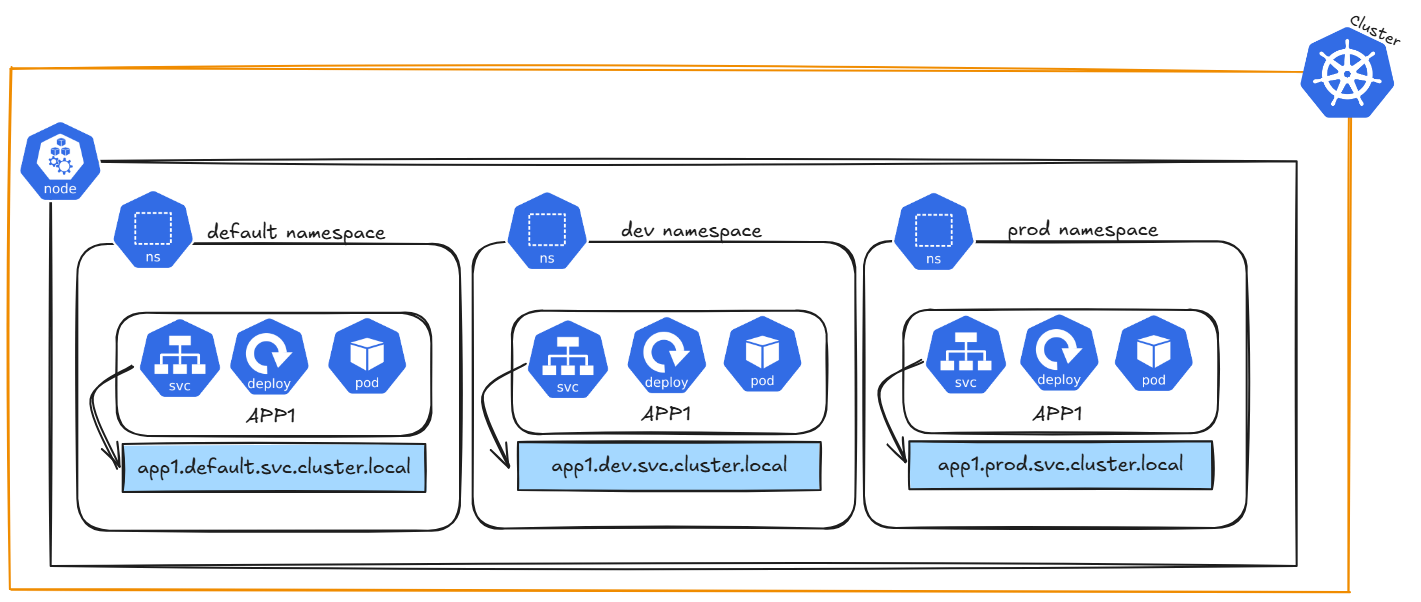
Kubernetes **namespaces** are like **virtual environments** within your Kubernetes cluster. They help organize and divide resources, making it easier to manage large environments. For example, you can use namespaces to separate development, staging, and production environments within the same cluster.
- **Isolation**: Namespaces isolate resources like Pods, Services, and Deployments, so they don't interfere with each other.
- **Resource Management**: You can apply resource limits (CPU, memory) and access control to namespaces.
- **Organization**: They help group related resources, making it easier to manage them.
- **Access Control**: Namespaces can limit who can access certain resources through Kubernetes RBAC (Role-Based Access Control).
- **Complexity**: Having too many namespaces can complicate management, especially with network policies or cross-namespace communication.
##### ****Command Reference Guide****
Remeber to use dry-run and tee to check the configuration of each command first.
--dry-run=client -o yaml | tee nginx-deployment.yaml
##### Create a Namespace using a YAML file (declarative method)
namespace.yaml
```yaml
apiVersion: v1
kind: Namespace
metadata:
name: dev
labels:
name: dev
---
apiVersion: v1
kind: Namespace
metadata:
name: prod
labels:
name: prod
```
```bash
# Create namespaces
kubectl create -f namespace.yaml
# Get namespaces
kubectl get namespaces --show-labels
# Add context spaces (First get user and clustername)
kubectl config view
CLUSTER_NAME=$(kubectl config view --raw -o jsonpath='{.clusters[0].name}')
USER_NAME=$(kubectl config view --raw -o jsonpath='{.users[0].name}')
kubectl config set-context dev --namespace=dev --cluster=$CLUSTER_NAME --user=$USER_NAME
kubectl config set-context prod --namespace=prod --cluster=$CLUSTER_NAME --user=$USER_NAME
# We added two new request contexts (dev and prod)
kubectl config view
# Switch context
kubectl config use-context dev
# Check current context
kubectl config current-context
# Create deployment in context dev and check pods
kubectl create deployment nginx-deployment --image=nginxdemos/hello --port=80
kubectl get pods
# Switch context and check pods
kubectl config use-context prod
kubectl get pods
# Delete context
kubectl config use-context default
kubectl config delete-context dev
kubectl config delete-context prod
```
# Deployment / ReplicaSet
##### ****Useful Links****
- [Kubernetes Official Documentation](https://kubernetes.io/docs/concepts/workloads/controllers/deployment/)
- [Using kubectl to Create a Deployment](https://kubernetes.io/docs/tutorials/kubernetes-basics/deploy-app/deploy-intro/)
##### ****Architecture****
##### ****Detailed Description****
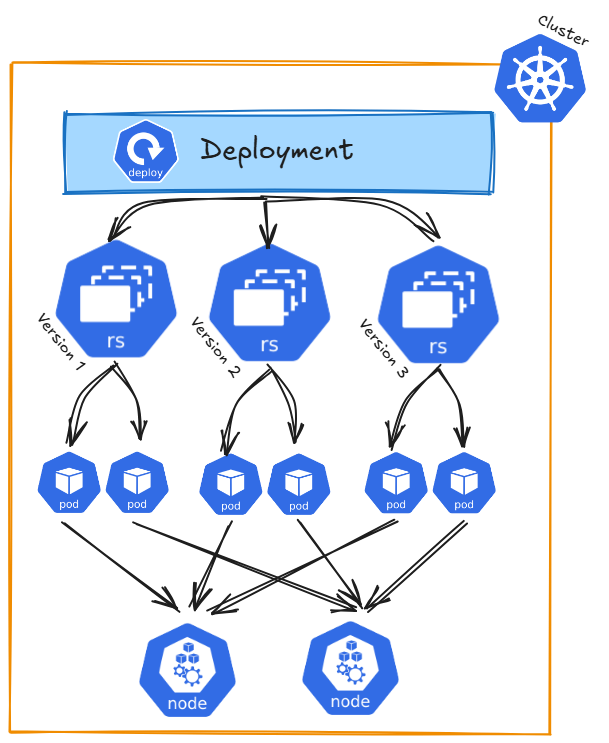
Kubernetes ```Deployments``` serve as a blueprint for running your application in a cluster. Building on ```ReplicaSets```, they ensure your application remains in the desired state by maintaining the defined number of instances.
****ReplicaSets take care of the following:****
- Ensuring the desired number of Pods are always running
- Replacing failed Pods automatically to maintain the specified replicas
****On top of that, a Deployment adds features, such as:****
- Automatically rolling out new versions of your application
- Rolling back to a previous version if something goes wrong
- Managing updates with strategies like rolling updates or recreating Pods
When a deployment in Kubernetes performs an upgrade (for example, if you change the image or other pod specifications), a rolling upgrade strategy is created by default. This manages the ReplicaSets to ensure minimal downtime and meet the constraints set by maxUnavailable and maxSurge.
The Deployment maintains a current ReplicaSet (for the existing pods) and creates a new ReplicaSet for the updated pods.
During the update, pods are gradually scaled down in the old ReplicaSet and scaled up in the new ReplicaSet.
****```revisionHistoryLimit```**** The Number of old replicas to retain for rollback.
****```strategy```**** Defines the deployment strategy, Default `RollingUpdate` or `Recreate`.
- Recreate: All existing Pods are destryoed before new ones are created
- RollingUpdate: Updates Pods in a rolling update fashion (maxUnavailable; maxUnavailable)
****```maxUnavailable```**** The maximum number of pods that can be unavailable (not running or ready) during the update. Default: 25% Ensures a certain number of old pods remain running during the update to handle requests.
*Example:* If there are 4 replicas in a Deployment and maxUnavailable is set to 1:
- At most, 1 pod can be unavailable during the update.
- Kubernetes will ensure at least 3 pods (old or new) are running at any given time.
****```maxSurge```**** The maximum number of extra pods that can be created beyond the desired replicas during the update. Default: 25% Determines how many new pods can be created during the update to replace old pods.
*Example:* If there are 4 replicas in a Deployment and maxSurge=1:
- Up to 5 pods (4 original + 1 new) can be running at once during the update.
##### ****Command Reference Guide****
Remeber to use dry-run and tee to check the configuration of each command first.
--dry-run=client -o yaml | tee nginx-deployment.yaml
##### Create a ReplicaSet using a YAML file (declarative method)
nginx-replicaset.yaml
```yaml
apiVersion: apps/v1
kind: ReplicaSet
metadata:
name: nginx-replicaset
spec:
replicas: 3
selector:
matchLabels:
app: nginx
template:
metadata:
labels:
app: nginx
spec:
containers:
- name: nginx
image: nginxdemos/hello
ports:
- containerPort: 80
```
```bash
# Apply replicaset
kubectl apply -f nginx-replicaset.yaml
# Get ReplicaSet informatoin
kubectl get replicaset nginx-replicaset -o wide
# Get detailed ReplicaSet information
kubectl describe replicaset/nginx-replicaset
# Check the current Pods running
kubectl get pods
# Delete a Pod of the ReplicaSet
FIRST_POD=$(kubectl get pods -l app=nginx -o jsonpath='{.items[0].metadata.name}')
kubectl delete pod $FIRST_POD
# Recheck running Pods
kubectl get pods
# Change image in yaml to nginxdemos/hello:v0.2 and apply replicaset again
kubectl apply -f nginx-replicaset.yaml
# You will encounter that the replicaset was updated - but the pods are still using the old image
kubectl describe replicaset/nginx-replicaset
kubectl describe pod/
# You have to kill and recreate the pods, so the new ones will be created with the new image. (see Hint section)
FIRST_POD=$(kubectl get pods -l app=nginx -o jsonpath='{.items[0].metadata.name}')
kubectl scale rs nginx-replicaset --replicas=0
kubectl scale rs nginx-replicaset --replicas=3
kubectl describe pod/$FIRST_POD
```
##### Create a Deplyoment (imperative method)
nginx-deployment.yaml
```yaml
apiVersion: apps/v1
kind: Deployment
metadata:
labels:
app: nginx-deployment
name: nginx-deployment
spec:
replicas: 25
selector:
matchLabels:
app: nginx-deployment
strategy:
rollingUpdate:
maxSurge: 25%
maxUnavailable: 25%
type: RollingUpdate
template:
metadata:
creationTimestamp: null
labels:
app: nginx-deployment
spec:
containers:
- image: nginxdemos/hello:0.4
imagePullPolicy: Always
name: hello
ports:
- containerPort: 80
protocol: TCP
resources: {}
status: {}
```
```bash
# Create nginx deployment with the default of one replica
kubectl create deployment nginx-deployment --image=nginxdemos/hello --port=80
# Create nginx deployment with three replicas
kubectl create deployment nginx-deployment --image=nginxdemos/hello --port=80 --replicas=3
# Check deployment
kubectl get deployment -o wide
# Get detailed deployment information
kubectl describe deployment
# Get ReplicaSet information created by deployment
kubectl get replicasets -o wide
# Get History for deployment
kubectl rollout history deployment/nginx-deployment
# Annotate inital history entry
kubectl annotate deployment/nginx-deployment kubernetes.io/change-cause="init nginx deployment"
kubectl rollout history deployment/nginx-deployment
# Scale up/down deployment (scale is not changing history)
kubectl scale deployment/nginx-deployment --replicas=2; watch kubectl get pods -o wide
kubectl scale deployment/nginx-deployment --replicas=20; watch kubectl get pods -o wide
# Run update and rollback
FIRST_POD=$(kubectl get pods -l app=nginx-deployment -o jsonpath='{.items[0].metadata.name}')
# Check image name
kubectl get pod $FIRST_POD -o jsonpath='{.spec.containers[0]}'}
kubectl get deployment/nginx-deployment -o yaml > nginx-deployment.yaml
# check Update yaml modifications under code section
kubectl apply -f nginx-deployment.yaml && kubectl rollout status deployment/nginx-deployment
kubectl annotate deployment/nginx-deployment kubernetes.io/change-cause="update new version"
kubectl rollout history deployment/nginx-deployment
# Recheck image name after update
kubectl get pod $FIRST_POD -o jsonpath='{.spec.containers[0]}'}
# Check replicaset
kubectl get replicaset
# ROllback to previouse revision
kubectl rollout undo deployment/nginx-deployment --to-revision=1 && kubectl rollout status deployment/nginx-deployment
kubectl rollout history deployment/nginx-deployment
# check pod image, as it was reverted to old revision
FIRST_POD=$(kubectl get pods -l app=nginx-deployment -o jsonpath='{.items[0].metadata.name}')
kubectl get pod $FIRST_POD -o jsonpath='{.spec.containers[0]}'}
# Run into failed state (change image in yaml to nginxdemos/hello:5.1)
kubectl apply -f nginx-deployment.yaml && kubectl rollout status deployment/nginx-deployment
kubectl annotate deployment/nginx-deployment kubernetes.io/change-cause="failed version"
kubectl rollout history deployment/nginx-deployment
kubectl rollout undo deployment/nginx-deployment --to-revision=3 && kubectl rollout status deployment/nginx-deployment
# check pod image, as it was reverted to healthy revision
FIRST_POD=$(kubectl get pods -l app=nginx-deployment -o jsonpath='{.items[0].metadata.name}')
kubectl get pod $FIRST_POD -o jsonpath='{.spec.containers[0]}'}
kubectl rollout history deployment/nginx-deployment
# Pause from deplyoment
kubectl rollout pause deployment nginx-deployment
kubectl set image deployment/nginx-deployment nginx=nginx:1.22
kubectl get deployment nginx-deployment -o yaml | grep paused
kubectl rollout resume deployment nginx-deployment
kubectl rollout status deployment nginx-deployment
# Delete deployment
kubectl delete deployment/nginx-deployment
```
##### ****Hints****
Deployments manage ****ReplicaSets****, primarily due to historical reasons. There is no practical need to manually create ReplicaSets (or previously, ReplicationControllers), as Deployments, built on top of ReplicaSets, offer a more user-friendly and feature-rich abstraction for managing the application lifecycle, including replication, updates, and rollbacks.
ReplicaSets do not support auto updates. As long as required number of pods exist matching the selector labels, replicaset's jobs is done.
When a ****rollback**** is applied to a Deployment, Kubernetes creates a new history revision for the rollback. It doesn’t simply go back to an old revision but treats the rollback as a new change. This means the rollback gets its own revision number, while the previous revisions remain saved. This helps you keep track of all changes, including rollbacks.
# Service / Endpoint
 
a) Why is the service DNS not reachable after creating service?? curl nginx.default.svc.cluster.local
##### ****Useful Links****
- [Kubernetes Official Documentation](https://kubernetes.io/docs/concepts/services-networking/service/)
##### ****Architecture****
##### ****Detailed Description****
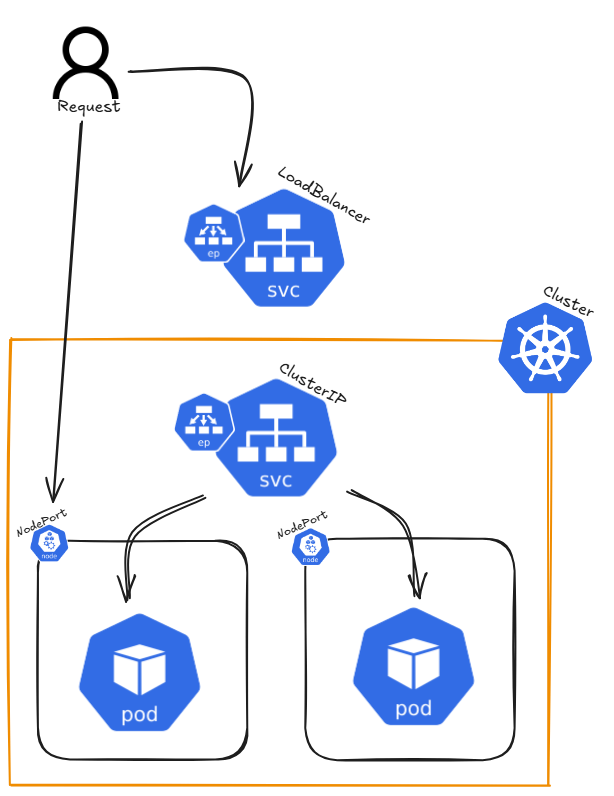
In Kubernetes, a Service is a way to expose an application running inside a set of Pods as a network service. It provides a stable IP address and DNS name, allowing access either from outside the cluster or from other Pods within the cluster. A Service serves as an abstraction layer, connecting clients to the appropriate Pods, ensuring that the actual Pods behind the Service can change without disrupting access.
****There are different types of Services in Kubernetes, including:****
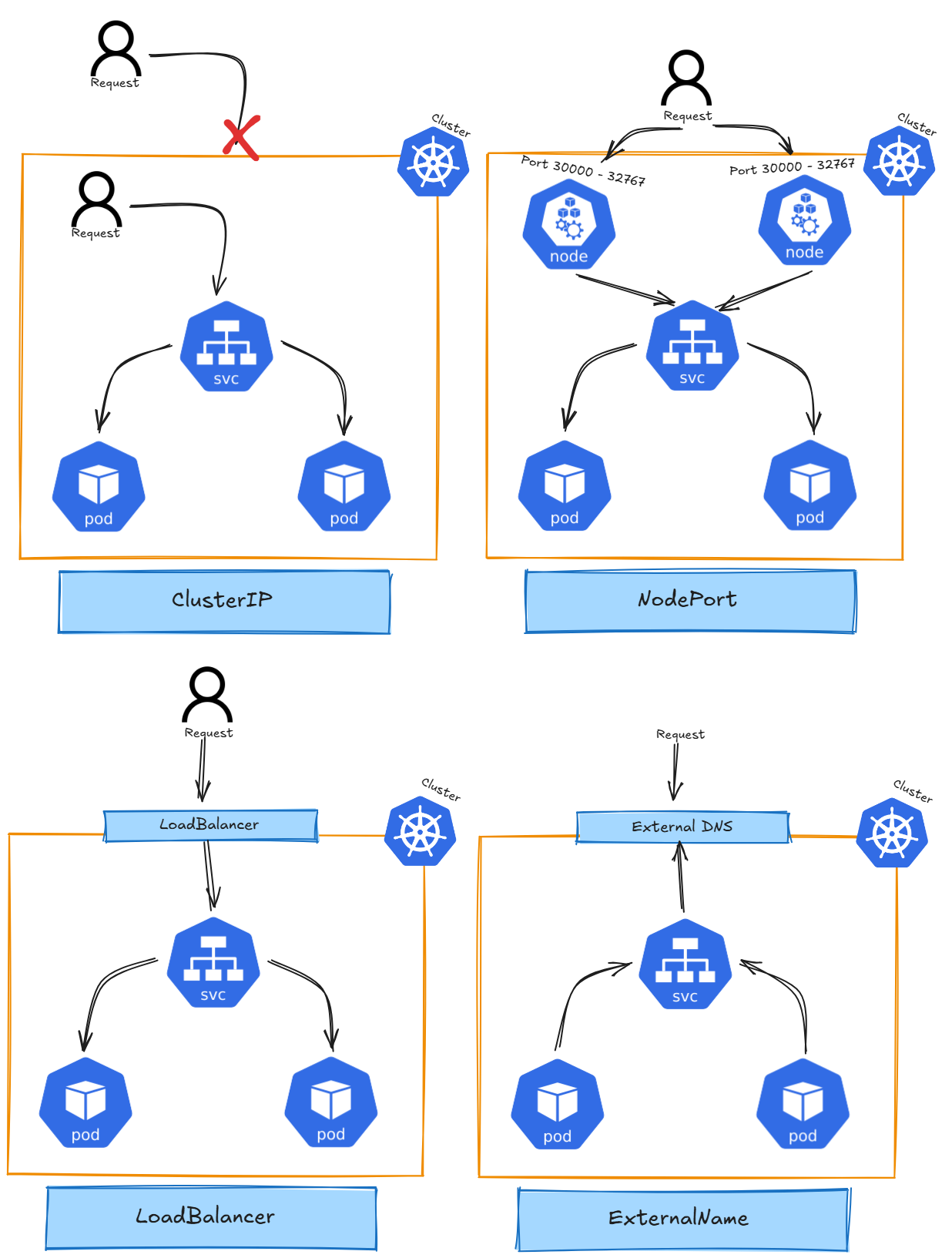
- ****ClusterIP:**** The default service type that assigns an internal IP, reachable only within the cluster. It allows communication between Pods inside the cluster. [Kube-Proxy](https://book.tikkle.de/books/cross-chapter-topics/page/kube-proxy) load balances traffic across pods behind a ClusterIP Service.
- ****NodePort:**** Exposes the service on a static port across all nodes in the cluster, allowing external traffic to access the service.
- ****LoadBalancer:**** In cloud environments, this service type provisions an external load balancer to distribute traffic to multiple Pods.
- ****ExternalName:**** Maps a service to an external DNS name, allowing Kubernetes services to refer to external resources.
- ****Headless Service:**** A type of ClusterIP service with no assigned IP. It allows direct access to Pods without a proxy.
Endpoints are associated with a Service and represent the IP addresses of the Pods that match the Service's selector. When a Service is created, Kubernetes automatically creates Endpoints for it, enabling traffic forwarding to the correct Pods.
##### ****Command Reference Guide****
****Cluster IP****
```bash
# Create nginx deployment with three replicas
kubectl create deployment nginx --image=nginxdemos/hello --port=80 --replicas=3
# Expose application as ClusterIP with port 8080 (ClusterIP is the default if not defined)
kubectl expose deployment nginx --type=ClusterIP --port=8080 --target-port=80
# --port=8080: The port exposed by the service (used internally to access the deployment)
# --target-port=80: The port on the pods where the application is running
# Get services
kubectl get service nginx -o wide
# Get full resource description using describe
kubectl describe service/nginx
# Get created endpoints
kubectl get endpoints
# curl by default service DNS entry
# Each curl request gets a different hostname due to Kubernetes' Kube-Proxy load balancing
curl nginx.default.svc.cluster.local
# Delete service
kubectl delete service/nginx
```
****NodePort:****
```bash
# Create nginx deployment with three replicas
kubectl create deployment nginx --image=nginxdemos/hello --port=80 --replicas=3
# Expose application as NodePort
kubectl expose deployment/nginx --type=NodePort
# Get services
kubectl get service nginx -o wide
# first Port = application;second Port = NodePort
# Get full resource description using describe
kubectl describe service/nginx
# Delete service
kubectl delete service/nginx
```
****LoadBalancer****
```bash
# Create nginx deployment with three replicas
kubectl create deployment nginx --image=nginxdemos/hello --port=80 --replicas=3
# Expose application as LoadBalancer
kubectl expose deployment/nginx --type=LoadBalancer --port 8080 --target-port 80
# Get services
kubectl get service nginx -o wide
# first Port = application;second Port = NodePort
# Get full resource description using describe
kubectl describe service/nginx
# Delete service
kubectl delete service/nginx
```
****ExternalName****
```bash
# Query running pods
kubectl get pods
# Query detailed informatoin about pods
kubectl get pods -o wide
# Create single pod
kubectl run nginx --image=nginx
# Run image / pass environment and command
kubectl run --image=ubuntu ubuntu --env="KEY=VALUE" -- sleep infinity
# Get yaml configuration for the resource
kubectl run nginx --image=nginx --dry-run=client -o yaml | tee nginx.yaml
# Get specific information of any yaml section
kubectl explain pod.spec.restartPolicy
# Create pod resource from yaml configuration file
kubectl create -f nginx.yaml
# Apply pod resource from yaml configuration
kubectl apply -f nginx.yaml
# Delete pod resource wihtout waiting for graceful shutdown of application (--now)
kubectl delete pod/nginx pod/ubuntu --now
# Get full resource description using descripe
kubectl describe pod/nginx
# Get logs for a specific container in the pod
kubectl logs pod/nginx -c nginx
# If a pod fails use -p to get previouse logs for a specific container in the pod
kubectl logs pod/nginx -c nginx -p
# Combine pod creation
kubectl run nginx --image=nginx --dry-run=client -o yaml | tee nginx.yaml
kubectl run ubuntu --image=ubuntu --dry-run=client -o yaml | tee ubuntu.yaml
{ cat nginx.yaml; echo "---"; cat ubuntu.yaml; } | tee multi_pods.yaml
kubectl apply -f multi_pods.yaml
```
****Headless Service****
```bash
# Query running pods
kubectl get pods
# Query detailed informatoin about pods
kubectl get pods -o wide
# Create single pod
kubectl run nginx --image=nginx
# Run image / pass environment and command
kubectl run --image=ubuntu ubuntu --env="KEY=VALUE" -- sleep infinity
# Get yaml configuration for the resource
kubectl run nginx --image=nginx --dry-run=client -o yaml | tee nginx.yaml
# Get specific information of any yaml section
kubectl explain pod.spec.restartPolicy
# Create pod resource from yaml configuration file
kubectl create -f nginx.yaml
# Apply pod resource from yaml configuration
kubectl apply -f nginx.yaml
# Delete pod resource wihtout waiting for graceful shutdown of application (--now)
kubectl delete pod/nginx pod/ubuntu --now
# Get full resource description using descripe
kubectl describe pod/nginx
# Get logs for a specific container in the pod
kubectl logs pod/nginx -c nginx
# If a pod fails use -p to get previouse logs for a specific container in the pod
kubectl logs pod/nginx -c nginx -p
# Combine pod creation
kubectl run nginx --image=nginx --dry-run=client -o yaml | tee nginx.yaml
kubectl run ubuntu --image=ubuntu --dry-run=client -o yaml | tee ubuntu.yaml
{ cat nginx.yaml; echo "---"; cat ubuntu.yaml; } | tee multi_pods.yaml
kubectl apply -f multi_pods.yaml
```
##### ****Hints****
When accessing an external IP (e.g., Node1's external IP), the hostname and IP displayed on the website may not change. To test Kubernetes' load-balancing behavior, cordon Node1 and delete the pod running on it. When you call Node1's IP again, kube-proxy will reroute the traffic to a healthy pod on another node.
# Job / Cronjob

##### ****Useful Links****
- [Kubernetes Official Documentation](https://kubernetes.io/docs/concepts/workloads/controllers/job/)
##### ****Architecture****
##### ****Detailed Description****
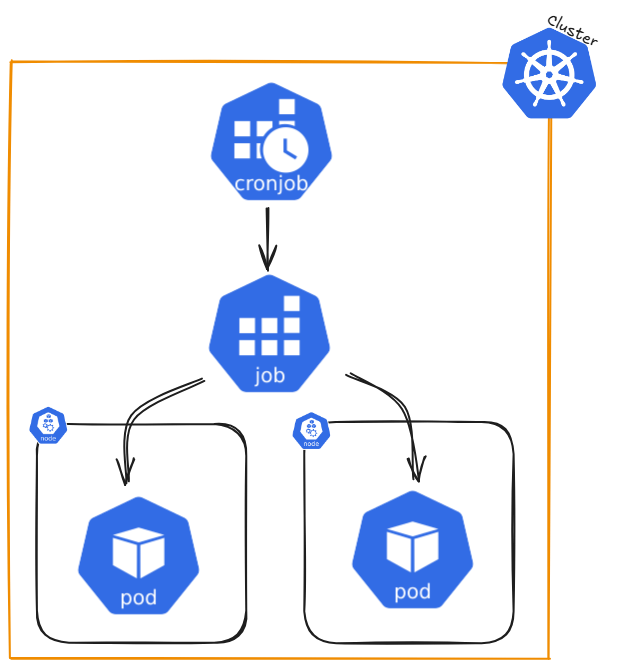
A Job creates one or more Pods and keeps retrying them until a specified number successfully finish. Once the desired number of successful completions is reached, the Job is complete. Deleting a Job also deletes the Pods it created, while suspending it will stop active Pods until the Job is resumed.
For a simple task, you can create a Job to run a single Pod, which will restart if it fails or is deleted (e.g., due to a node failure). Jobs can also run multiple Pods at the same time.
the job name ```.metadata.name``` should follow rules for DNS subdomain (ideally stricter rules but cannot be longer 63 chars)
- Non-parallel Jobs:
- The Job creates only one Pod
- The Job is complete when the Pod successfully finishes
- Parallel Jobs with a fixed completion count:
- Set ```.spec.completions``` to a number greater than 0. (e.g. completions: 5)
- The Job is complete when the specified number of Pods have finished successfully.
- Optionally, set ```.spec.completionMode``` to "Indexed" if each Pod has a specific role or task
- Parallel Jobs with a work queue:
- Leave .spec.completions unset
- Set ```.spec.parallelism``` to the number of Pods that can run simultaneously (e.g. parallelism: 3 - default: 1 - parallelism: 0 will pause the job)
- The Pods coordinate with each other or an external service to divide the work
- Once any Pod finishes successfully, no new Pods are started, and the Job is complete when all Pods stop
- Restart policy
- In ```.spec.template.spec.restartPolicy```, you must set an appropriate restart policy: (```Never``` or ```OnFailure```)
- For Jobs with ```.spec.completions```, you can set ```.spec.completionMode```:
- ```NonIndexed``` (default): All Pods are identical, and the Job completes when the specified number of successful Pods (```.spec.completions```) is reached.
- ```Indexed```: Each Pod gets a unique index (from 0 to .spec.completions - 1), which is available via:
- Pod annotation: batch.kubernetes.io/job-completion-index.
- Pod label (from Kubernetes v1.28 onwards): batch.kubernetes.io/job-completion-index.
- Environment variable: JOB_COMPLETION_INDEX.
- Pod hostname: Follows the pattern $(job-name)-$(index).
Example: Non-parallel Job (Single Pod):
```yaml
apiVersion: batch/v1
kind: Job
metadata:
name: single-task-job
spec:
template:
spec:
containers:
- name: worker
image: busybox
command: ["echo", "Hello World"]
restartPolicy: Never
```
Parallel Job with Fixed Completions:
```yaml
apiVersion: batch/v1
kind: Job
metadata:
name: fixed-task-job
spec:
completions: 5
parallelism: 2
template:
spec:
containers:
- name: worker
image: busybox
command: ["echo", "Processing task"]
restartPolicy: OnFailure
```
Parallel Job with Work Queue:
```yaml
apiVersion: batch/v1
kind: Job
metadata:
name: work-queue-job
spec:
parallelism: 3
template:
spec:
containers:
- name: worker
image: busybox
command: ["fetch-and-process-task"]
restartPolicy: Never
```
Indexed CompletionMode:
```yaml
apiVersion: batch/v1
kind: Job
metadata:
name: indexed-job
spec:
completions: 3 # Job completes when all 3 indexed Pods have succeeded
parallelism: 2 # At most 2 Pods run simultaneously
completionMode: Indexed
template:
spec:
containers:
- name: worker
image: busybox
command:
- /bin/sh
- -c
- |
echo "Processing task for index $JOB_COMPLETION_INDEX"
restartPolicy: Never
```
If you want to run a Job on a schedule, use a CronJob.
##### ****Command Reference Guide****
Remeber to use dry-run and tee to check the configuration of each command first.
--dry-run=client -o yaml | tee nginx-deployment.yaml
##### Create a Namespace using a YAML file (declarative method)
```yaml
apiVersion: v1
kind: Namespace
metadata:
name: dev
labels:
name: dev
---
apiVersion: v1
kind: Namespace
metadata:
name: prod
labels:
name: prod
```
```bash
# Create namespaces
kubectl create -f namespace.yaml
# Get namespaces
kubectl get namespaces --show-labels
# Add context spaces (First get user and clustername)
kubectl config view
CLUSTER_NAME=$(kubectl config view --raw -o jsonpath='{.clusters[0].name}')
USER_NAME=$(kubectl config view --raw -o jsonpath='{.users[0].name}')
kubectl config set-context dev --namespace=dev --cluster=$CLUSTER_NAME --user=$USER_NAME
kubectl config set-context prod --namespace=prod --cluster=$CLUSTER_NAME --user=$USER_NAME
# We added two new request contexts (dev and prod)
kubectl config view
# Switch context
kubectl config use-context dev
# Check current context
kubectl config current-context
# Create deployment in context dev and check pods
kubectl create deployment nginx-deployment --image=nginxdemos/hello --port=80
kubectl get pods
# Switch context and check pods
kubectl config use-context prod
kubectl get pods
# Delete context
kubectl config use-context default
kubectl config delete-context dev
kubectl config delete-context prod
```
# StatefulSets / DaemonSet
 
##### ****Useful Links****
- [Kubernetes Official Documentation (StatefulSets)](https://kubernetes.io/docs/concepts/workloads/controllers/statefulset/)
- [Kubernetes Official Documentation (DaemonSet)](https://kubernetes.io/docs/concepts/workloads/controllers/daemonset/)
##### ****Architecture****

##### ****Detailed Description****
Next to deployments, there are also ```StatefulSets``` and ```DaemonSets``` in Kubernetes, designed for specific types of workloads.
****StatefulSets:****
- **```Purpose```**: Used for applications that require **stable, persistent storage** and **consistent network identities** (like databases or messaging systems).
- **```Key Features```**:
- Pods are created **sequentially** with unique, predictable names (e.g., `my-app-0`, `my-app-1`).
- Each Pod gets its **own persistent storage** (via Persistent Volume Claims) that remains even if the Pod is deleted.
- Useful for applications that need to keep track of their state or require **ordered scaling**.
****DaemonSets:****
- **```Purpose```**: Ensure that a **copy of a Pod runs on every node** (or specific nodes) in the cluster.
- **```Key Features```**:
- Pods are automatically **added or removed** when nodes are added or removed.
- Commonly used for **system-level services** like logging, monitoring, or networking agents (e.g., Fluentd, Prometheus Node Exporter).
- Each node gets exactly **one Pod**.
##### ****Command Reference Guide****
Remeber to use dry-run and tee to check the configuration of each command first.
--dry-run=client -o yaml | tee nginx-deployment.yaml
##### Create a StatefulSets using a YAML file (declarative method)
nginx-statefulset.yaml
```yaml
apiVersion: v1
kind: Namespace
metadata:
name: stateful-namespace
---
apiVersion: apps/v1
kind: StatefulSet
metadata:
name: nginx-statefulset
namespace: stateful-namespace
spec:
serviceName: "nginx"
replicas: 1
selector:
matchLabels:
app: nginx
template:
metadata:
labels:
app: nginx
spec:
affinity:
nodeAffinity:
requiredDuringSchedulingIgnoredDuringExecution:
nodeSelectorTerms:
- matchExpressions:
- key: kubernetes.io/hostname
operator: In
values:
- minikube-m02
containers:
- name: nginx
image: nginx
volumeMounts:
- name: nginx-storage
mountPath: /usr/share/nginx/html
volumeClaimTemplates:
- metadata:
name: nginx-storage
spec:
accessModes:
- ReadWriteOnce
resources:
requests:
storage: 1Gi
persistentVolumeClaimRetentionPolicy:
whenScaled: Delete
whenDeleted: Retain
```
```bash
# Apply the StatefulSet
kubectl apply -f nginx-statefulset.yaml
# Write data to pod
kubectl exec -it -n stateful-namespace nginx-statefulset-0 -- /bin/bash
echo "Hello from StatefulSet" > /usr/share/nginx/html/index.html
exit
# Delete pod
kubectl delete pod nginx-statefulset-0 -n stateful-namespace --now
# Check file since pod is recreated on same node (check nodeAffinity in yaml)
kubectl exec -it -n stateful-namespace nginx-statefulset-0 -- /bin/bash
cat /usr/share/nginx/html/index.html
#Delete the stateful set
kubectl delete statefulset nginx-statefulset -n stateful-namespace
# Reaply the statefulset
kubectl apply -f nginx-statefulset.yaml
# Check file since pod is recreated on same node (check nodeAffinity in yaml)
kubectl exec -it -n stateful-namespace nginx-statefulset-0 -- /bin/bash
cat /usr/share/nginx/html/index.html
```
Change ```whenDeleted: Retain``` to ```whenDeleted: Delete``` in yaml file and retry full szenario.
##### Create a Deplyoment (imperative method)
nginx-deployment.yaml
```yaml
apiVersion: apps/v1
kind: Deployment
metadata:
labels:
app: nginx-deployment
name: nginx-deployment
spec:
replicas: 25
selector:
matchLabels:
app: nginx-deployment
strategy:
rollingUpdate:
maxSurge: 25%
maxUnavailable: 25%
type: RollingUpdate
template:
metadata:
creationTimestamp: null
labels:
app: nginx-deployment
spec:
containers:
- image: nginxdemos/hello:0.4
imagePullPolicy: Always
name: hello
ports:
- containerPort: 80
protocol: TCP
resources: {}
status: {}
```
```bash
# Create nginx deployment with the default of one replica
kubectl create deployment nginx-deployment --image=nginxdemos/hello --port=80
# Create nginx deployment with three replicas
kubectl create deployment nginx-deployment --image=nginxdemos/hello --port=80 --replicas=3
# Check deployment
kubectl get deployment -o wide
# Get detailed deployment information
kubectl describe deployment
# Get ReplicaSet information created by deployment
kubectl get replicasets -o wide
# Get History for deployment
kubectl rollout history deployment/nginx-deployment
# Annotate inital history entry
kubectl annotate deployment/nginx-deployment kubernetes.io/change-cause="init nginx deployment"
kubectl rollout history deployment/nginx-deployment
# Scale up/down deployment (scale is not changing history)
kubectl scale deployment/nginx-deployment --replicas=2; watch kubectl get pods -o wide
kubectl scale deployment/nginx-deployment --replicas=20; watch kubectl get pods -o wide
# Run update and rollback
FIRST_POD=$(kubectl get pods -l app=nginx-deployment -o jsonpath='{.items[0].metadata.name}')
# Check image name
kubectl get pod $FIRST_POD -o jsonpath='{.spec.containers[0]}'}
kubectl get deployment/nginx-deployment -o yaml > nginx-deployment.yaml
# check Update yaml modifications under code section
kubectl apply -f nginx-deployment.yaml && kubectl rollout status deployment/nginx-deployment
kubectl annotate deployment/nginx-deployment kubernetes.io/change-cause="update new version"
kubectl rollout history deployment/nginx-deployment
# Recheck image name after update
kubectl get pod $FIRST_POD -o jsonpath='{.spec.containers[0]}'}
# Check replicaset
kubectl get replicaset
# ROllback to previouse revision
kubectl rollout undo deployment/nginx-deployment --to-revision=1 && kubectl rollout status deployment/nginx-deployment
kubectl rollout history deployment/nginx-deployment
# check pod image, as it was reverted to old revision
FIRST_POD=$(kubectl get pods -l app=nginx-deployment -o jsonpath='{.items[0].metadata.name}')
kubectl get pod $FIRST_POD -o jsonpath='{.spec.containers[0]}'}
# Run into failed state (change image in yaml to nginxdemos/hello:5.1)
kubectl apply -f nginx-deployment.yaml && kubectl rollout status deployment/nginx-deployment
kubectl annotate deployment/nginx-deployment kubernetes.io/change-cause="failed version"
kubectl rollout history deployment/nginx-deployment
kubectl rollout undo deployment/nginx-deployment --to-revision=3 && kubectl rollout status deployment/nginx-deployment
# check pod image, as it was reverted to healthy revision
FIRST_POD=$(kubectl get pods -l app=nginx-deployment -o jsonpath='{.items[0].metadata.name}')
kubectl get pod $FIRST_POD -o jsonpath='{.spec.containers[0]}'}
kubectl rollout history deployment/nginx-deployment
# Pause from deplyoment
kubectl rollout pause deployment nginx-deployment
kubectl set image deployment/nginx-deployment nginx=nginx:1.22
kubectl get deployment nginx-deployment -o yaml | grep paused
kubectl rollout resume deployment nginx-deployment
kubectl rollout status deployment nginx-deployment
# Delete deployment
kubectl delete deployment/nginx-deployment
```
##### ****Hints****
Deployments manage ****ReplicaSets****, primarily due to historical reasons. There is no practical need to manually create ReplicaSets (or previously, ReplicationControllers), as Deployments, built on top of ReplicaSets, offer a more user-friendly and feature-rich abstraction for managing the application lifecycle, including replication, updates, and rollbacks.
ReplicaSets do not support auto updates. As long as required number of pods exist matching the selector labels, replicaset's jobs is done.
When a ****rollback**** is applied to a Deployment, Kubernetes creates a new history revision for the rollback. It doesn’t simply go back to an old revision but treats the rollback as a new change. This means the rollback gets its own revision number, while the previous revisions remain saved. This helps you keep track of all changes, including rollbacks.