# Job / Cronjob

##### ****Useful Links****
- [Kubernetes Official Documentation](https://kubernetes.io/docs/concepts/workloads/controllers/job/)
##### ****Architecture****
##### ****Detailed Description****
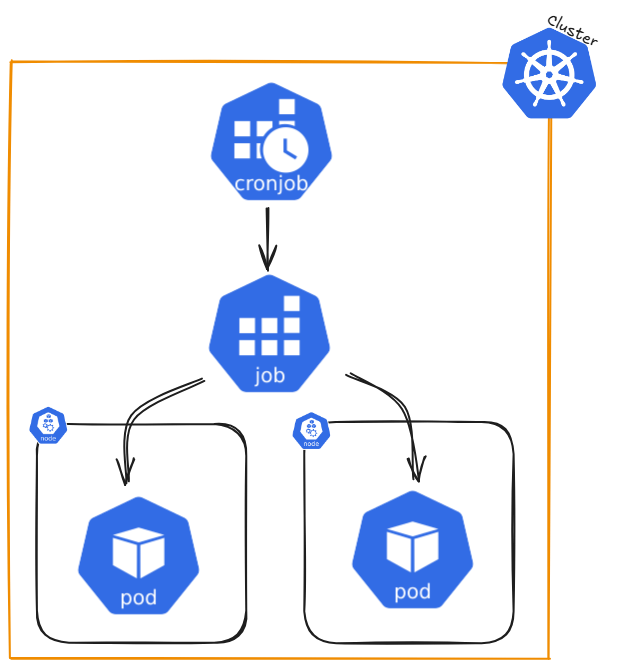
A Job creates one or more Pods and keeps retrying them until a specified number successfully finish. Once the desired number of successful completions is reached, the Job is complete. Deleting a Job also deletes the Pods it created, while suspending it will stop active Pods until the Job is resumed.
For a simple task, you can create a Job to run a single Pod, which will restart if it fails or is deleted (e.g., due to a node failure). Jobs can also run multiple Pods at the same time.
the job name ```.metadata.name``` should follow rules for DNS subdomain (ideally stricter rules but cannot be longer 63 chars)
- Non-parallel Jobs:
- The Job creates only one Pod
- The Job is complete when the Pod successfully finishes
- Parallel Jobs with a fixed completion count:
- Set ```.spec.completions``` to a number greater than 0. (e.g. completions: 5)
- The Job is complete when the specified number of Pods have finished successfully.
- Optionally, set ```.spec.completionMode``` to "Indexed" if each Pod has a specific role or task
- Parallel Jobs with a work queue:
- Leave .spec.completions unset
- Set ```.spec.parallelism``` to the number of Pods that can run simultaneously (e.g. parallelism: 3 - default: 1 - parallelism: 0 will pause the job)
- The Pods coordinate with each other or an external service to divide the work
- Once any Pod finishes successfully, no new Pods are started, and the Job is complete when all Pods stop
- Restart policy
- In ```.spec.template.spec.restartPolicy```, you must set an appropriate restart policy: (```Never``` or ```OnFailure```)
- For Jobs with ```.spec.completions```, you can set ```.spec.completionMode```:
- ```NonIndexed``` (default): All Pods are identical, and the Job completes when the specified number of successful Pods (```.spec.completions```) is reached.
- ```Indexed```: Each Pod gets a unique index (from 0 to .spec.completions - 1), which is available via:
- Pod annotation: batch.kubernetes.io/job-completion-index.
- Pod label (from Kubernetes v1.28 onwards): batch.kubernetes.io/job-completion-index.
- Environment variable: JOB_COMPLETION_INDEX.
- Pod hostname: Follows the pattern $(job-name)-$(index).
Example: Non-parallel Job (Single Pod):
```yaml
apiVersion: batch/v1
kind: Job
metadata:
name: single-task-job
spec:
template:
spec:
containers:
- name: worker
image: busybox
command: ["echo", "Hello World"]
restartPolicy: Never
```
Parallel Job with Fixed Completions:
```yaml
apiVersion: batch/v1
kind: Job
metadata:
name: fixed-task-job
spec:
completions: 5
parallelism: 2
template:
spec:
containers:
- name: worker
image: busybox
command: ["echo", "Processing task"]
restartPolicy: OnFailure
```
Parallel Job with Work Queue:
```yaml
apiVersion: batch/v1
kind: Job
metadata:
name: work-queue-job
spec:
parallelism: 3
template:
spec:
containers:
- name: worker
image: busybox
command: ["fetch-and-process-task"]
restartPolicy: Never
```
Indexed CompletionMode:
```yaml
apiVersion: batch/v1
kind: Job
metadata:
name: indexed-job
spec:
completions: 3 # Job completes when all 3 indexed Pods have succeeded
parallelism: 2 # At most 2 Pods run simultaneously
completionMode: Indexed
template:
spec:
containers:
- name: worker
image: busybox
command:
- /bin/sh
- -c
- |
echo "Processing task for index $JOB_COMPLETION_INDEX"
restartPolicy: Never
```
If you want to run a Job on a schedule, use a CronJob.
##### ****Command Reference Guide****
Remeber to use dry-run and tee to check the configuration of each command first.
--dry-run=client -o yaml | tee nginx-deployment.yaml
##### Create a Namespace using a YAML file (declarative method)
```yaml
apiVersion: v1
kind: Namespace
metadata:
name: dev
labels:
name: dev
---
apiVersion: v1
kind: Namespace
metadata:
name: prod
labels:
name: prod
```
```bash
# Create namespaces
kubectl create -f namespace.yaml
# Get namespaces
kubectl get namespaces --show-labels
# Add context spaces (First get user and clustername)
kubectl config view
CLUSTER_NAME=$(kubectl config view --raw -o jsonpath='{.clusters[0].name}')
USER_NAME=$(kubectl config view --raw -o jsonpath='{.users[0].name}')
kubectl config set-context dev --namespace=dev --cluster=$CLUSTER_NAME --user=$USER_NAME
kubectl config set-context prod --namespace=prod --cluster=$CLUSTER_NAME --user=$USER_NAME
# We added two new request contexts (dev and prod)
kubectl config view
# Switch context
kubectl config use-context dev
# Check current context
kubectl config current-context
# Create deployment in context dev and check pods
kubectl create deployment nginx-deployment --image=nginxdemos/hello --port=80
kubectl get pods
# Switch context and check pods
kubectl config use-context prod
kubectl get pods
# Delete context
kubectl config use-context default
kubectl config delete-context dev
kubectl config delete-context prod
```