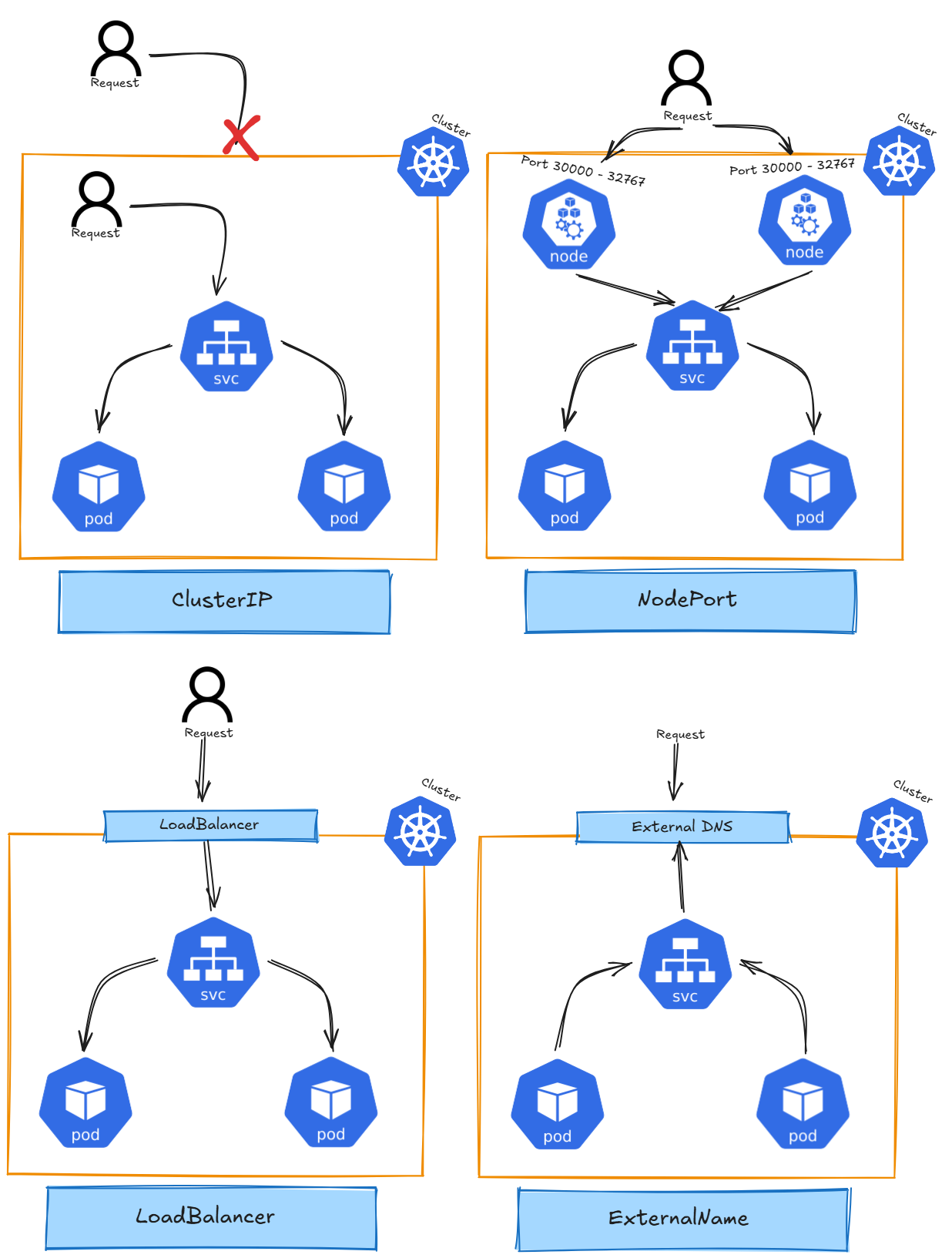
# Service / Endpoint
 
a) Why is the service DNS not reachable after creating service?? curl nginx.default.svc.cluster.local
##### ****Useful Links****
- [Kubernetes Official Documentation](https://kubernetes.io/docs/concepts/services-networking/service/)
##### ****Architecture****
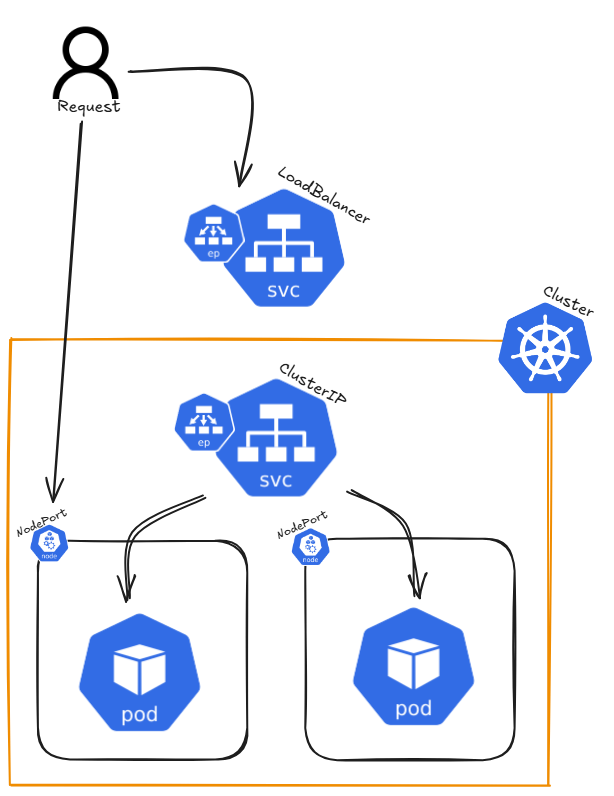
##### ****Detailed Description****
In Kubernetes, a Service is a way to expose an application running inside a set of Pods as a network service. It provides a stable IP address and DNS name, allowing access either from outside the cluster or from other Pods within the cluster. A Service serves as an abstraction layer, connecting clients to the appropriate Pods, ensuring that the actual Pods behind the Service can change without disrupting access.
****There are different types of Services in Kubernetes, including:****
- ****ClusterIP:**** The default service type that assigns an internal IP, reachable only within the cluster. It allows communication between Pods inside the cluster. [Kube-Proxy](https://book.tikkle.de/books/cross-chapter-topics/page/kube-proxy) load balances traffic across pods behind a ClusterIP Service.
- ****NodePort:**** Exposes the service on a static port across all nodes in the cluster, allowing external traffic to access the service.
- ****LoadBalancer:**** In cloud environments, this service type provisions an external load balancer to distribute traffic to multiple Pods.
- ****ExternalName:**** Maps a service to an external DNS name, allowing Kubernetes services to refer to external resources.
- ****Headless Service:**** A type of ClusterIP service with no assigned IP. It allows direct access to Pods without a proxy.
Endpoints are associated with a Service and represent the IP addresses of the Pods that match the Service's selector. When a Service is created, Kubernetes automatically creates Endpoints for it, enabling traffic forwarding to the correct Pods.
##### ****Command Reference Guide****
****Cluster IP****
```bash
# Create nginx deployment with three replicas
kubectl create deployment nginx --image=nginxdemos/hello --port=80 --replicas=3
# Expose application as ClusterIP with port 8080 (ClusterIP is the default if not defined)
kubectl expose deployment nginx --type=ClusterIP --port=8080 --target-port=80
# --port=8080: The port exposed by the service (used internally to access the deployment)
# --target-port=80: The port on the pods where the application is running
# Get services
kubectl get service nginx -o wide
# Get full resource description using describe
kubectl describe service/nginx
# Get created endpoints
kubectl get endpoints
# curl by default service DNS entry
# Each curl request gets a different hostname due to Kubernetes' Kube-Proxy load balancing
curl nginx.default.svc.cluster.local
# Delete service
kubectl delete service/nginx
```
****NodePort:****
```bash
# Create nginx deployment with three replicas
kubectl create deployment nginx --image=nginxdemos/hello --port=80 --replicas=3
# Expose application as NodePort
kubectl expose deployment/nginx --type=NodePort
# Get services
kubectl get service nginx -o wide
# first Port = application;second Port = NodePort
# Get full resource description using describe
kubectl describe service/nginx
# Delete service
kubectl delete service/nginx
```
****LoadBalancer****
```bash
# Create nginx deployment with three replicas
kubectl create deployment nginx --image=nginxdemos/hello --port=80 --replicas=3
# Expose application as LoadBalancer
kubectl expose deployment/nginx --type=LoadBalancer --port 8080 --target-port 80
# Get services
kubectl get service nginx -o wide
# first Port = application;second Port = NodePort
# Get full resource description using describe
kubectl describe service/nginx
# Delete service
kubectl delete service/nginx
```
****ExternalName****
```bash
# Query running pods
kubectl get pods
# Query detailed informatoin about pods
kubectl get pods -o wide
# Create single pod
kubectl run nginx --image=nginx
# Run image / pass environment and command
kubectl run --image=ubuntu ubuntu --env="KEY=VALUE" -- sleep infinity
# Get yaml configuration for the resource
kubectl run nginx --image=nginx --dry-run=client -o yaml | tee nginx.yaml
# Get specific information of any yaml section
kubectl explain pod.spec.restartPolicy
# Create pod resource from yaml configuration file
kubectl create -f nginx.yaml
# Apply pod resource from yaml configuration
kubectl apply -f nginx.yaml
# Delete pod resource wihtout waiting for graceful shutdown of application (--now)
kubectl delete pod/nginx pod/ubuntu --now
# Get full resource description using descripe
kubectl describe pod/nginx
# Get logs for a specific container in the pod
kubectl logs pod/nginx -c nginx
# If a pod fails use -p to get previouse logs for a specific container in the pod
kubectl logs pod/nginx -c nginx -p
# Combine pod creation
kubectl run nginx --image=nginx --dry-run=client -o yaml | tee nginx.yaml
kubectl run ubuntu --image=ubuntu --dry-run=client -o yaml | tee ubuntu.yaml
{ cat nginx.yaml; echo "---"; cat ubuntu.yaml; } | tee multi_pods.yaml
kubectl apply -f multi_pods.yaml
```
****Headless Service****
```bash
# Query running pods
kubectl get pods
# Query detailed informatoin about pods
kubectl get pods -o wide
# Create single pod
kubectl run nginx --image=nginx
# Run image / pass environment and command
kubectl run --image=ubuntu ubuntu --env="KEY=VALUE" -- sleep infinity
# Get yaml configuration for the resource
kubectl run nginx --image=nginx --dry-run=client -o yaml | tee nginx.yaml
# Get specific information of any yaml section
kubectl explain pod.spec.restartPolicy
# Create pod resource from yaml configuration file
kubectl create -f nginx.yaml
# Apply pod resource from yaml configuration
kubectl apply -f nginx.yaml
# Delete pod resource wihtout waiting for graceful shutdown of application (--now)
kubectl delete pod/nginx pod/ubuntu --now
# Get full resource description using descripe
kubectl describe pod/nginx
# Get logs for a specific container in the pod
kubectl logs pod/nginx -c nginx
# If a pod fails use -p to get previouse logs for a specific container in the pod
kubectl logs pod/nginx -c nginx -p
# Combine pod creation
kubectl run nginx --image=nginx --dry-run=client -o yaml | tee nginx.yaml
kubectl run ubuntu --image=ubuntu --dry-run=client -o yaml | tee ubuntu.yaml
{ cat nginx.yaml; echo "---"; cat ubuntu.yaml; } | tee multi_pods.yaml
kubectl apply -f multi_pods.yaml
```
##### ****Hints****
When accessing an external IP (e.g., Node1's external IP), the hostname and IP displayed on the website may not change. To test Kubernetes' load-balancing behavior, cordon Node1 and delete the pod running on it. When you call Node1's IP again, kube-proxy will reroute the traffic to a healthy pod on another node.