# KCNA

Kubernetes and Cloud Native Associate

# Kubernetes and Cloud Native Associate (KCNA)

<p class="callout warning">The information presented here were collected in November/December 2024 and were accurate at that time. However, it is possible that the KCNA content has beed been updated. Please verify the latest details from the official sources and kubernetes documentation.</p>

<div id="bkmrk-" style="text-align: center;"> ![KCNA-Logo](https://book.tikkle.de/uploads/images/gallery/2024-11/scaled-1680-/kcna-logo1.png)</div><details id="bkmrk-exam-detailsonline-e"><summary>Exam Details</summary>

- Online Exam
- Certification Valid for 2 Years
- Includes 12 Month Exam Eligibility
- One Retake
- Multiple Choice Exam
- Duration of Exam 90 Minutes

</details>#### KCNA domain overview

- [Kubernetes Fundamentals - 46%](https://book.tikkle.de/books/kcna/chapter/kubernetes-fundamentals)
- [Container Orchestration - 22%](https://book.tikkle.de/books/kcna/chapter/container-orchestration)
- [Cloud Native Architecture - 16%](https://book.tikkle.de/books/kcna/chapter/cloud-native-architecture)
- [Cloud Native Observability - 8%](https://book.tikkle.de/books/kcna/chapter/cloud-native-observability)
- [Cloud Native Application Delivery - 8%](https://book.tikkle.de/books/kcna/chapter/cloud-native-application-delivery)

#### Acronyms

<table id="bkmrk-term-description-k8s"><thead><tr><th>**Term**</th><th>**Description**</th></tr></thead><tbody><tr><td>K8s</td><td>Kubernetes</td></tr><tr><td>CNCF</td><td>Cloud Native Computing Foundation</td></tr><tr><td>RBAC</td><td>Role Based Access Control</td></tr><tr><td>OCI</td><td>Open Container Initiative</td></tr><tr><td>CRI</td><td>Container Runtime Interface</td></tr><tr><td>CI/CD</td><td>Continuous Integration &amp; Continuous Deployment</td></tr></tbody></table>

#### Useful Links

<p class="callout info"><span style="white-space: pre-wrap;">During the exams, it is allowed to access the official Kubernetes documentation. Therefore, it is recommended that you study the documentation and familiarize yourself with it. </span> [https://kubernetes.io/docs/home](https://kubernetes.io/docs/home)</p>

**Official KCNA information pages**

- [https://training.linuxfoundation.org/certification/kubernetes-cloud-native-associate](https://training.linuxfoundation.org/certification/kubernetes-cloud-native-associate)
- [https://github.com/cncf/curriculum/tree/master/kcna](https://github.com/cncf/curriculum/tree/master/kcna)
- [https://kubernetes.io/docs/reference/generated/kubectl/kubectl-commands](https://kubernetes.io/docs/reference/generated/kubectl/kubectl-commands#-strong-getting-started-strong-)
- [https://landscape.cncf.io/](https://landscape.cncf.io/)

**Useful courses, notes and on-hand labs**

- [https://killercoda.com/](https://killercoda.com/)
- [https://www.exampro.co/kcna](https://www.exampro.co/kcna)<span style="white-space: pre-wrap;"> (</span>[https://www.youtube.com/watch?v=AplluksKvzI&amp;t=43597s](https://www.youtube.com/watch?v=AplluksKvzI&t=43597s))
- [https://github.com/bradmccoydev/Kubernetes-and-Cloud-Native-Associate-KCNA/tree/main](https://github.com/bradmccoydev/Kubernetes-and-Cloud-Native-Associate-KCNA/tree/main)
- [https://www.civo.com/academy](https://www.civo.com/academy)
- [https://diveinto.com/p/dive-into-cloud-native-containers-kubernetes-and-the-kcna](https://diveinto.com/p/dive-into-cloud-native-containers-kubernetes-and-the-kcna)
- [https://collabnix.github.io/kubelabs/](https://collabnix.github.io/kubelabs/)
- [https://labs.play-with-k8s.com/](https://labs.play-with-k8s.com/)

**More helpful and interesting linksx**

- [https://minikube.sigs.k8s.io](https://minikube.sigs.k8s.io/docs/start/?arch=%2Fwindows%2Fx86-64%2Fstable%2F.exe+download)
- [https://k3s.io/](https://k3s.io/)
- [https://kodekloud.com/pages/educational-resources/kubernetes-elements-map](https://kodekloud.com/pages/educational-resources/kubernetes-elements-map)

# Kubernetes Fundamentals

# Kubernetes Resources

In Kubernetes, resources are like building blocks used to create and manage your cluster. Each resource is an object with metadata (such as names and labels) and a desired state that defines its behavior. All objects in Kubernetes are managed by an API and stored in the etcd database. 

For example, a Pod resource defines how to run a group of containers, while a Service resource manages network access to those containers. Everything you can manage with [```kubectl```](https://kubernetes.io/docs/reference/kubectl/#resource-types) or the Kubernetes API - like workloads, storage, or configuration - is a resource, making them essential for defining and controlling your cluster's behavior.

The following command lists all the resources that can be managed in a Kubernetes cluster, including their names, short names, API versions, and whether they are namespaced:

 ```bash 
 kubectl api-resources
```

The most relevant resources for the KCNA exam are marked red

#### Resource Overview
You can link to the table here

****Core Resources****
- **<span style="color:red;">Pod</span>** <a href="https://book.tikkle.de/books/cross-chapter-topics/page/pod"><i class="fa-solid fa-link"></a>
- **<span style="color:red;">Service</span>** <a href="https://book.tikkle.de/books/cross-chapter-topics/page/service"><i class="fa-solid fa-link"></i></a>
- **<span style="color:red;">ConfigMap</span>**  
- **<span style="color:red;">Secret</span>**  
- **<span style="color:red;">Namespace</span>** <a href="https://book.tikkle.de/books/cross-chapter-topics/page/namespace"><i class="fa-solid fa-link"></a>  
- PersistentVolume  
- PersistentVolumeClaim  
- ServiceAccount  
- Binding  
- ComponentStatus  
- **<span style="color:red;">Endpoints</span>** <a href="https://book.tikkle.de/books/cross-chapter-topics/page/service"><i class="fa-solid fa-link"></i></a>  
- Event  
- LimitRange  
- PodTemplate  
- ReplicationController  
- ResourceQuota

****Workloads****
- **<span style="color:red;">Deployment</span>**  <a href="https://book.tikkle.de/books/cross-chapter-topics/page/deployment"><i class="fa-solid fa-link"></i></a>
- **<span style="color:red;">ReplicaSet</span>**  <a href="https://book.tikkle.de/books/cross-chapter-topics/page/deployment"><i class="fa-solid fa-link"></i></a>
- **<span style="color:red;">DaemonSet</span>**  
- StatefulSet  
- **<span style="color:red;">CronJob</span>**  <a href="https://book.tikkle.de/books/cross-chapter-topics/page/job-cronjob"><i class="fa-solid fa-link"> 
- **<span style="color:red;">Job</span>**  <a href="https://book.tikkle.de/books/cross-chapter-topics/page/job-cronjob"><i class="fa-solid fa-link">
- ControllerRevision

****Networking****  
- **<span style="color:red;">Ingress</span>**  
- NetworkPolicy  
- IngressClass  

****RBAC (Role-Based Access Control)****  
- **<span style="color:red;">Role</span>**  
- **<span style="color:red;">RoleBinding</span>**  
- ClusterRole  
- ClusterRoleBinding  

****Storage****  
- **<span style="color:red;">StorageClass</span>**  
- CSIDriver  
- CSINode  
- CSIStorageCapacity  
- VolumeAttachment  

****Admission Control****  
- MutatingWebhookConfiguration  
- ValidatingWebhookConfiguration  

****API Extensions****  
- CustomResourceDefinition  
- APIService  

****Authentication and Authorization****  
- TokenReview  
- LocalSubjectAccessReview  
- SelfSubjectAccessReview  
- SelfSubjectRulesReview  
- SubjectAccessReview  

****Autoscaling**** 
- **<span style="color:red;">HorizontalPodAutoscaler</span>**  

****Certificates****
- CertificateSigningRequest  

****Coordination****
- Lease  

****Discovery****
- EndpointSlice  

****Events****
- Event  

****Flow Control****
- FlowSchema  
- PriorityLevelConfiguration  

****Node Management****
- RuntimeClass  

****Policies****
- PodDisruptionBudget  
- PodSecurityPolicy  


****Scheduling****
- PriorityClass

# Kubernetes Architecture

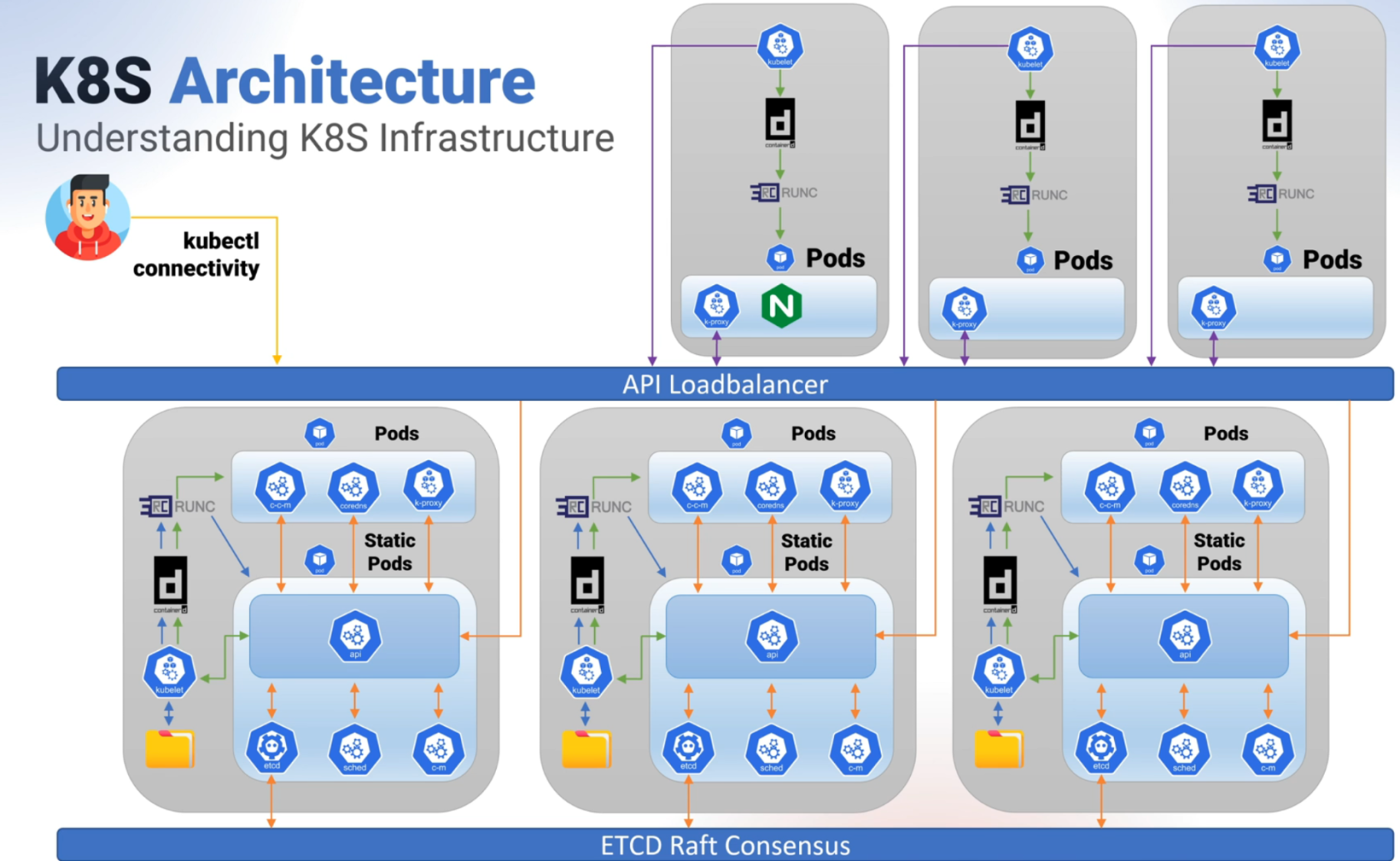
### **Control Plane:**

1. API Server (`kube-apiserver`)
2. etcd
3. Controller Manager (`kube-controller-manager`)
4. Scheduler (`kube-scheduler`)
5. Cloud Controller Manager (optional)

### **Node (Worker Node):**

1. Kubelet
2. Kube Proxy
3. Container Runtime (z. B. containerd, CRI-O, Docker)

[![image.png](https://book.tikkle.de/uploads/images/gallery/2024-11/scaled-1680-/image.png)](https://book.tikkle.de/uploads/images/gallery/2024-11/image.png)
# Kubernetes API

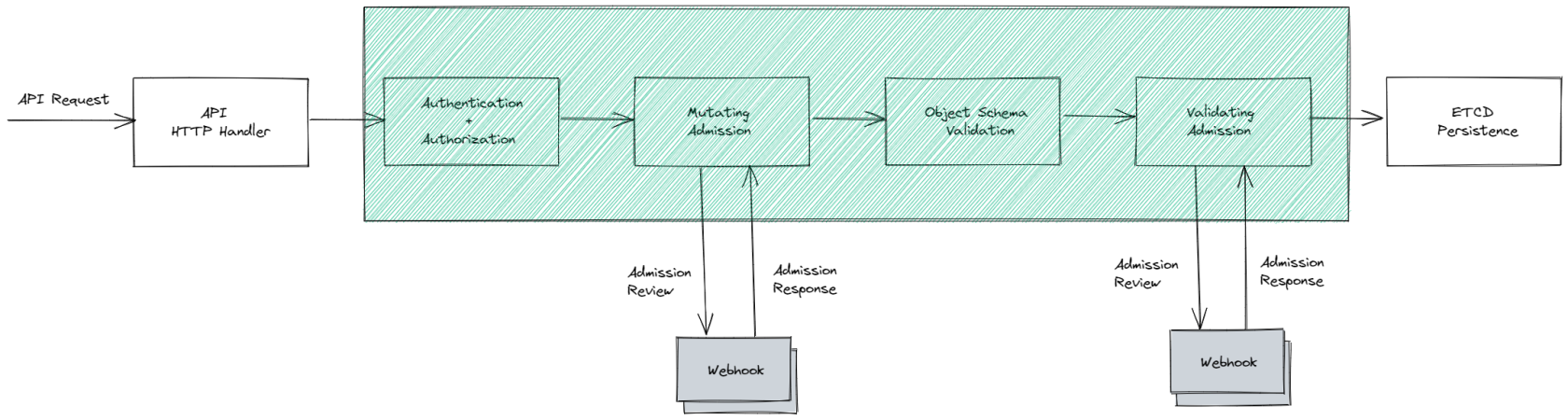
Kubernetes is an object based system - everything is managed and stored in objects, and it also provides the tools to manage those objects. 

Each object contains of three parts:

1. **Metadata**: Information about the object, like its name and labels.
2. **Specification (spec)**: What you want Kubernetes to do—your "desired state." For example, "run 3 replicas of my app."
3. **Status**: What's actually happening right now—Kubernetes updates this as it works to match the current state to the desired state.

This interaction with objects happens through the Kubernetes API, which is the core interface of Kubernetes. The Kubernetes API provides a universal way for users, automation tools, and Kubernetes itself to interact with the objects stored in the system. It allows you to create, update, delete, and retrieve information about the various object resources (like Pods, Deployments, Services, etc.) within a Kubernetes cluster.

[![](https://book.tikkle.de/uploads/images/gallery/2024-11/scaled-1680-/image-1732368449137.png)](https://book.tikkle.de/uploads/images/gallery/2024-11/image-1732368449137.png)
# Containers

- **What is a Container?**
    
    
    - Lightweight and portable.
    - OS-level virtualization (compared to VMs).
    - Runs applications and dependencies in an isolated environment.
- **Container Runtime:**
    
    
    - OCI standards for container image format.
    - Examples: `containerd`, `CRI-O`, `runc`, Docker.
    - How Kubernetes interacts with container runtimes through the Container Runtime Interface (CRI).
- **Container Images:**
    
    
    - Layers and image composition.
    - Building images using Dockerfile.
    - Storing and retrieving images from registries (Docker Hub, Artifact Registry, etc.).
- **Container Lifecycle:**
    
    
    - Creation, running, stopping containers.
    - Restart policies in Kubernetes (Always, OnFailure, Never).
- **Security:**
    
    
    - Image scanning and vulnerability management.
    - Running containers with least privilege (user ID and group).
    - Container isolation using namespaces and cgroups.
- **Networking:**
    
    
    - Container Network Interface (CNI) plugins.
    - Port mapping and exposing services.
    - Container-to-container and container-to-host communication.
- **Storage:**
    
    
    - Ephemeral storage (temporary storage for containers).
    - Persistent storage (using volumes in Kubernetes).
    - Mounting and sharing volumes between containers.

# Scheduling

- **What is Scheduling?**
    
    
    - Process of assigning Pods to Nodes in a Kubernetes cluster.
- **Kubernetes Scheduler:**
    
    
    - The component responsible for deciding which Node a Pod should run on.
    - Works based on the available resources and the Pod's resource requirements.
- **Node Selection:**
    
    
    - Factors considered by the scheduler: 
        - CPU, memory resources.
        - Node affinity.
        - Taints and tolerations.
        - Pod affinity and anti-affinity.
        - Resource requests and limits.
- **Scheduling Policies:**
    
    
    - Default scheduling behavior.
    - Priority scheduling (priority classes).
    - Custom scheduling policies (e.g., using `kube-scheduler` with custom rules).
- **Affinity and Anti-Affinity:**
    
    
    - **Node Affinity:** Constraints that allow or prevent Pods from being scheduled on specific nodes.
    - **Pod Affinity:** Ensures that Pods are scheduled on nodes where other specific Pods are running.
    - **Pod Anti-Affinity:** Ensures Pods are not scheduled on the same node as other specified Pods.
- **Taints and Tolerations:**
    
    
    - **Taints:** Applied to Nodes to prevent Pods from being scheduled unless they tolerate the taint.
    - **Tolerations:** Allow Pods to be scheduled on Nodes with specific taints.
- **Resource Requests and Limits:**
    
    
    - **Requests:** Minimum amount of resources a Pod needs (scheduler uses this to place Pods).
    - **Limits:** Maximum amount of resources a Pod can use (enforced during execution).
- **Preemption:**
    
    
    - When a Pod with higher priority displaces lower-priority Pods to be scheduled.
- **Scheduler Extenders:**
    
    
    - Custom schedulers or extender mechanisms to modify default scheduling decisions.
- **Pod Disruption Budgets (PDB):**
    
    
    - Used to manage voluntary disruptions (like upgrades) to ensure availability during disruptions.

# Container Orchestration

# Container Orchestration Fundamentals

- **Need for Orchestration:**
    
    
    - Scaling applications.
    - Self-healing of workloads.
    - Load balancing.
    - Resource optimization.
- **Kubernetes as an Orchestration Tool:**
    
    
    - Managing containerized workloads.
    - Scheduling containers on nodes.
    - Ensuring desired state (via Deployments, ReplicaSets).
- **Core Orchestration Features in Kubernetes:**
    
    
    - Automatic scaling (Horizontal Pod Autoscaler).
    - Rolling updates and rollbacks.
    - Service discovery and networking.
    - Persistent storage management.
- **Workload Orchestration Concepts:**
    
    
    - Pods as the smallest deployable unit.
    - Running multiple containers in a Pod (e.g., sidecar pattern).

# Runtime

1. **What is Container Runtime?**
    
    
    - A container runtime is software responsible for running containers, managing their lifecycle (start, stop, execute), and interacting with the operating system to create and manage containers.
2. **Kubernetes and Container Runtime:**
    
    
    - Kubernetes interacts with the container runtime through the **Container Runtime Interface (CRI)**.
    - The container runtime is responsible for pulling container images, creating containers, running them, and managing their lifecycle on a node.
3. **Popular Container Runtimes in Kubernetes:**
    
    
    - **Docker** (historically the most common, though deprecated in Kubernetes as of v1.20+ in favor of other runtimes).
    - **containerd**: A high-performance container runtime used by Kubernetes, focused on running containers.
    - **CRI-O**: A lightweight container runtime specifically built for Kubernetes, adhering strictly to the Kubernetes Container Runtime Interface (CRI).
    - **runc**: The low-level container runtime that creates and runs containers based on the OCI (Open Container Initiative) standards; often used by containerd and CRI-O.
4. **Container Runtime Interface (CRI):**
    
    
    - A Kubernetes API that allows the kubelet to communicate with various container runtimes.
    - Ensures that Kubernetes can support multiple runtimes (e.g., Docker, containerd, CRI-O) by abstracting runtime-specific details.
5. **Runtime Features:**
    
    
    - **Container Image Management:** Pulling, caching, and running images.
    - **Container Lifecycle Management:** Starting, stopping, and cleaning up containers.
    - **Namespaces &amp; Cgroups:** Providing isolation for containers (ensuring they have their own process space, network, etc.).
6. **Runtime in Kubernetes Workflow:**
    
    
    - **Kubelet** requests container runtimes to start or stop containers on a node.
    - **PodSpec** in Kubernetes specifies what containers to run; the runtime manages the execution.
7. **Runtime Security Considerations:**
    
    
    - Using **runtime security tools** to scan container images and ensure compliance with security standards.
    - Enforcing security policies through runtime, such as restricting container privileges (user IDs, rootless containers).
8. **Transition from Docker to containerd/CRI-O:**
    
    
    - As of Kubernetes 1.20+, **Docker** is no longer the default container runtime.
    - Docker is replaced with **containerd** or **CRI-O** for better integration with Kubernetes.

In the **KCNA exam**, understanding how Kubernetes interacts with **container runtimes** and the different **runtime options** is essential, particularly focusing on how Kubernetes uses the **Container Runtime Interface (CRI)** to communicate with container runtimes like **containerd** or **CRI-O**.

# Security

### **1. Container Security:**

- **Image Scanning:**
    - Ensuring container images are free from vulnerabilities before deployment.
    - Tools like **Clair**, **Trivy**, or **Anchore** can scan for known vulnerabilities in container images.
- **Immutable Images:**
    - Using read-only images and containers to prevent modification at runtime.

### **2. Pod Security:**

- **Pod Security Policies (PSP)** (deprecated in Kubernetes 1.21, but still relevant in older versions): 
    - Define security controls for Pods (e.g., allow or disallow privileged containers, restrict running as root, enforce read-only file systems).
    - Controls what actions can be performed on Pods, such as running containers as root or accessing sensitive host files.
- **Pod Security Standards (PSS):**
    - New set of security controls for Pods replacing PSP, with three levels: **Privileged**, **Baseline**, and **Restricted**.
- **Admission Controllers:**
    - The **PodSecurityAdmission** (PSA) admission controller enforces the Pod Security Standards (PSS).
    - You can configure it at the namespace level with annotations that specify which PSS level (Privileged, Baseline, Restricted) is required.

### **3. Role-Based Access Control (RBAC):**

- **Roles and RoleBindings:**
    - Define who can access Kubernetes resources and what operations they can perform.
    - Granular permissions on resources like Pods, Services, ConfigMaps, and more.
- **ClusterRoles and ClusterRoleBindings:**
    - Used for setting permissions across the entire Kubernetes cluster.

### **4. Service Accounts and Identity Management:**

- **Service Accounts:**
    - Kubernetes uses service accounts to grant applications running in Pods permissions to access Kubernetes API resources.
- **Identity and Access Management (IAM):**
    - Integration with external identity providers (e.g., AWS IAM, Azure AD) to control access to Kubernetes resources.

### **5. Network Security:**

- **Network Policies:**
    - Define rules for controlling the communication between Pods (e.g., allow traffic only from specific Pods, block access from certain networks).
    - Ensure secure communication within the cluster.
- **TLS Encryption:**
    - Encrypting communication between services and between Pods using **Transport Layer Security (TLS)**.
- **Service Mesh (e.g., Istio):**
    - Provides secure communication between microservices by enforcing mTLS, along with fine-grained access control.

### **6. Secrets Management:**

- **Kubernetes Secrets:**
    - Store sensitive information like API keys, tokens, passwords in Kubernetes resources.
    - Secrets can be mounted as volumes or injected as environment variables into containers.
- **Encryption at Rest:**
    - Ensuring that Secrets and sensitive data are encrypted when stored in etcd.
- **Third-Party Tools for Secret Management:**
    - Integration with tools like **HashiCorp Vault**, **SealedSecrets**, or **AWS Secrets Manager** for enhanced security.

### **7. Container Runtime Security:**

- **Security Contexts:**
    - Define security settings for Pods and containers (e.g., setting user IDs, restricting privileges, setting capabilities).
- **RunAsUser &amp; RunAsGroup:**
    - Define the user and group ID under which a container should run, limiting privileges.
- **Privilege Escalation:**
    - Prevent containerized applications from gaining escalated privileges (e.g., running as root).

### **8. Audit Logging:**

- **Audit Logs:**
    - Kubernetes provides audit logs to record access and actions performed on the API server.
    - Helps with monitoring and detecting suspicious or unauthorized access.

### **9. Supply Chain Security:**

- **Secure Supply Chain:**
    - Ensuring security in every step of the container supply chain, from image creation to deployment.
    - Using signed images (e.g., via **Notary** or **Cosign**) to ensure image integrity.

### **10. Vulnerability Management:**

- **Kubernetes Security Contexts:**
    - Controls around running containers with restricted privileges (e.g., no access to the host network or storage).
- **Runtime Security (e.g., Falco):**
    - Tools like **Falco** that monitor container behavior during runtime to detect security incidents like unauthorized network access or privilege escalation.

# Networking

<div class="flex-shrink-0 flex flex-col relative items-end" id="bkmrk-"><div><div class="pt-0"><div class="gizmo-bot-avatar flex h-8 w-8 items-center justify-center overflow-hidden rounded-full"><div class="relative p-1 rounded-sm flex items-center justify-center bg-token-main-surface-primary text-token-text-primary h-8 w-8"><svg class="icon-md" fill="none" height="41" role="img" viewbox="0 0 41 41" width="41" xmlns="http://www.w3.org/2000/svg"><text x="-9999" y="-9999"></text><path d="M37.5324 16.8707C37.9808 15.5241 38.1363 14.0974 37.9886 12.6859C37.8409 11.2744 37.3934 9.91076 36.676 8.68622C35.6126 6.83404 33.9882 5.3676 32.0373 4.4985C30.0864 3.62941 27.9098 3.40259 25.8215 3.85078C24.8796 2.7893 23.7219 1.94125 22.4257 1.36341C21.1295 0.785575 19.7249 0.491269 18.3058 0.500197C16.1708 0.495044 14.0893 1.16803 12.3614 2.42214C10.6335 3.67624 9.34853 5.44666 8.6917 7.47815C7.30085 7.76286 5.98686 8.3414 4.8377 9.17505C3.68854 10.0087 2.73073 11.0782 2.02839 12.312C0.956464 14.1591 0.498905 16.2988 0.721698 18.4228C0.944492 20.5467 1.83612 22.5449 3.268 24.1293C2.81966 25.4759 2.66413 26.9026 2.81182 28.3141C2.95951 29.7256 3.40701 31.0892 4.12437 32.3138C5.18791 34.1659 6.8123 35.6322 8.76321 36.5013C10.7141 37.3704 12.8907 37.5973 14.9789 37.1492C15.9208 38.2107 17.0786 39.0587 18.3747 39.6366C19.6709 40.2144 21.0755 40.5087 22.4946 40.4998C24.6307 40.5054 26.7133 39.8321 28.4418 38.5772C30.1704 37.3223 31.4556 35.5506 32.1119 33.5179C33.5027 33.2332 34.8167 32.6547 35.9659 31.821C37.115 30.9874 38.0728 29.9178 38.7752 28.684C39.8458 26.8371 40.3023 24.6979 40.0789 22.5748C39.8556 20.4517 38.9639 18.4544 37.5324 16.8707ZM22.4978 37.8849C20.7443 37.8874 19.0459 37.2733 17.6994 36.1501C17.7601 36.117 17.8666 36.0586 17.936 36.0161L25.9004 31.4156C26.1003 31.3019 26.2663 31.137 26.3813 30.9378C26.4964 30.7386 26.5563 30.5124 26.5549 30.2825V19.0542L29.9213 20.998C29.9389 21.0068 29.9541 21.0198 29.9656 21.0359C29.977 21.052 29.9842 21.0707 29.9867 21.0902V30.3889C29.9842 32.375 29.1946 34.2791 27.7909 35.6841C26.3872 37.0892 24.4838 37.8806 22.4978 37.8849ZM6.39227 31.0064C5.51397 29.4888 5.19742 27.7107 5.49804 25.9832C5.55718 26.0187 5.66048 26.0818 5.73461 26.1244L13.699 30.7248C13.8975 30.8408 14.1233 30.902 14.3532 30.902C14.583 30.902 14.8088 30.8408 15.0073 30.7248L24.731 25.1103V28.9979C24.7321 29.0177 24.7283 29.0376 24.7199 29.0556C24.7115 29.0736 24.6988 29.0893 24.6829 29.1012L16.6317 33.7497C14.9096 34.7416 12.8643 35.0097 10.9447 34.4954C9.02506 33.9811 7.38785 32.7263 6.39227 31.0064ZM4.29707 13.6194C5.17156 12.0998 6.55279 10.9364 8.19885 10.3327C8.19885 10.4013 8.19491 10.5228 8.19491 10.6071V19.808C8.19351 20.0378 8.25334 20.2638 8.36823 20.4629C8.48312 20.6619 8.64893 20.8267 8.84863 20.9404L18.5723 26.5542L15.206 28.4979C15.1894 28.5089 15.1703 28.5155 15.1505 28.5173C15.1307 28.5191 15.1107 28.516 15.0924 28.5082L7.04046 23.8557C5.32135 22.8601 4.06716 21.2235 3.55289 19.3046C3.03862 17.3858 3.30624 15.3413 4.29707 13.6194ZM31.955 20.0556L22.2312 14.4411L25.5976 12.4981C25.6142 12.4872 25.6333 12.4805 25.6531 12.4787C25.6729 12.4769 25.6928 12.4801 25.7111 12.4879L33.7631 17.1364C34.9967 17.849 36.0017 18.8982 36.6606 20.1613C37.3194 21.4244 37.6047 22.849 37.4832 24.2684C37.3617 25.6878 36.8382 27.0432 35.9743 28.1759C35.1103 29.3086 33.9415 30.1717 32.6047 30.6641C32.6047 30.5947 32.6047 30.4733 32.6047 30.3889V21.188C32.6066 20.9586 32.5474 20.7328 32.4332 20.5338C32.319 20.3348 32.154 20.1698 31.955 20.0556ZM35.3055 15.0128C35.2464 14.9765 35.1431 14.9142 35.069 14.8717L27.1045 10.2712C26.906 10.1554 26.6803 10.0943 26.4504 10.0943C26.2206 10.0943 25.9948 10.1554 25.7963 10.2712L16.0726 15.8858V11.9982C16.0715 11.9783 16.0753 11.9585 16.0837 11.9405C16.0921 11.9225 16.1048 11.9068 16.1207 11.8949L24.1719 7.25025C25.4053 6.53903 26.8158 6.19376 28.2383 6.25482C29.6608 6.31589 31.0364 6.78077 32.2044 7.59508C33.3723 8.40939 34.2842 9.53945 34.8334 10.8531C35.3826 12.1667 35.5464 13.6095 35.3055 15.0128ZM14.2424 21.9419L10.8752 19.9981C10.8576 19.9893 10.8423 19.9763 10.8309 19.9602C10.8195 19.9441 10.8122 19.9254 10.8098 19.9058V10.6071C10.8107 9.18295 11.2173 7.78848 11.9819 6.58696C12.7466 5.38544 13.8377 4.42659 15.1275 3.82264C16.4173 3.21869 17.8524 2.99464 19.2649 3.1767C20.6775 3.35876 22.0089 3.93941 23.1034 4.85067C23.0427 4.88379 22.937 4.94215 22.8668 4.98473L14.9024 9.58517C14.7025 9.69878 14.5366 9.86356 14.4215 10.0626C14.3065 10.2616 14.2466 10.4877 14.2479 10.7175L14.2424 21.9419ZM16.071 17.9991L20.4018 15.4978L24.7325 17.9975V22.9985L20.4018 25.4983L16.071 22.9985V17.9991Z" fill="currentColor"></path></svg></div></div></div></div></div>### **Networking in Kubernetes (KCNA Relevant)**

Networking is a core component of Kubernetes, enabling communication between Pods, Services, and external resources. Below are the relevant **Networking** topics for **Kubernetes** in the context of the **KCNA** exam:

<div class="group/conversation-turn relative flex w-full min-w-0 flex-col agent-turn" id="bkmrk--1"><div class="flex-col gap-1 md:gap-3"><div class="flex max-w-full flex-col flex-grow"><div class="min-h-8 text-message flex w-full flex-col items-end gap-2 whitespace-normal break-words [.text-message+&]:mt-5" data-message-author-role="assistant" data-message-id="57504685-9da6-4847-b4f3-e83d5b6fe7a5" data-message-model-slug="gpt-4o-mini" dir="auto"><div class="flex w-full flex-col gap-1 empty:hidden first:pt-[3px]"><div class="markdown prose w-full break-words dark:prose-invert light">---

</div></div></div></div></div></div>### **1. Kubernetes Networking Basics:**

<div class="group/conversation-turn relative flex w-full min-w-0 flex-col agent-turn" id="bkmrk-pod-to-pod-communica"><div class="flex-col gap-1 md:gap-3"><div class="flex max-w-full flex-col flex-grow"><div class="min-h-8 text-message flex w-full flex-col items-end gap-2 whitespace-normal break-words [.text-message+&]:mt-5" data-message-author-role="assistant" data-message-id="57504685-9da6-4847-b4f3-e83d5b6fe7a5" data-message-model-slug="gpt-4o-mini" dir="auto"><div class="flex w-full flex-col gap-1 empty:hidden first:pt-[3px]"><div class="markdown prose w-full break-words dark:prose-invert light">- **Pod-to-Pod Communication:**
    - Pods can communicate with each other within a Kubernetes cluster using their IP addresses.
    - Kubernetes assigns each Pod a unique IP address, and Pods on different nodes can communicate with each other over the cluster network.
- **Flat Network Model:**
    - Kubernetes assumes that every Pod can communicate with every other Pod in the cluster without NAT (Network Address Translation).

</div></div></div></div></div></div>### **2. Services in Kubernetes:**

<div class="group/conversation-turn relative flex w-full min-w-0 flex-col agent-turn" id="bkmrk-clusterip-%28default%29%3A"><div class="flex-col gap-1 md:gap-3"><div class="flex max-w-full flex-col flex-grow"><div class="min-h-8 text-message flex w-full flex-col items-end gap-2 whitespace-normal break-words [.text-message+&]:mt-5" data-message-author-role="assistant" data-message-id="57504685-9da6-4847-b4f3-e83d5b6fe7a5" data-message-model-slug="gpt-4o-mini" dir="auto"><div class="flex w-full flex-col gap-1 empty:hidden first:pt-[3px]"><div class="markdown prose w-full break-words dark:prose-invert light">- **ClusterIP (default):**
    - Exposes a service on a cluster-internal IP address. This type of service is only accessible within the Kubernetes cluster.
- **NodePort:**
    - Exposes a service on a specific port on each Node's IP address. Allows external access to the service through `<NodeIP>:<NodePort>`.
- **LoadBalancer:**
    - Provisioned by cloud providers to expose services externally, typically using an external load balancer (e.g., AWS ELB, GCP Load Balancer).
- **ExternalName:**
    - Maps a service to an external DNS name, allowing Kubernetes to access external services by their DNS names.

</div></div></div></div></div></div>### **3. DNS (Domain Name System):**

<div class="group/conversation-turn relative flex w-full min-w-0 flex-col agent-turn" id="bkmrk-coredns%3A-kubernetes-"><div class="flex-col gap-1 md:gap-3"><div class="flex max-w-full flex-col flex-grow"><div class="min-h-8 text-message flex w-full flex-col items-end gap-2 whitespace-normal break-words [.text-message+&]:mt-5" data-message-author-role="assistant" data-message-id="57504685-9da6-4847-b4f3-e83d5b6fe7a5" data-message-model-slug="gpt-4o-mini" dir="auto"><div class="flex w-full flex-col gap-1 empty:hidden first:pt-[3px]"><div class="markdown prose w-full break-words dark:prose-invert light">- **CoreDNS:**
    - Kubernetes uses **CoreDNS** for service discovery. Each Service gets a DNS entry that can be accessed using its name within the cluster.
- **Service Discovery:**
    - Pods can access Services using DNS names (e.g., `my-service.my-namespace.svc.cluster.local`).

</div></div></div></div></div></div>### **4. Network Policies:**

<div class="group/conversation-turn relative flex w-full min-w-0 flex-col agent-turn" id="bkmrk-network-policies%3A-al"><div class="flex-col gap-1 md:gap-3"><div class="flex max-w-full flex-col flex-grow"><div class="min-h-8 text-message flex w-full flex-col items-end gap-2 whitespace-normal break-words [.text-message+&]:mt-5" data-message-author-role="assistant" data-message-id="57504685-9da6-4847-b4f3-e83d5b6fe7a5" data-message-model-slug="gpt-4o-mini" dir="auto"><div class="flex w-full flex-col gap-1 empty:hidden first:pt-[3px]"><div class="markdown prose w-full break-words dark:prose-invert light">- **Network Policies:**
    - Allows you to control the communication between Pods. You can define rules to allow or block traffic between Pods based on labels, IP blocks, or namespaces.
- **Ingress and Egress Rules:**
    - Ingress: Incoming traffic to Pods.
    - Egress: Outgoing traffic from Pods.
- **Pod Security:**
    - Control which Pods can communicate with others, enhancing network isolation and security.

</div></div></div></div></div></div>### **5. Ingress and Egress Controllers:**

<div class="group/conversation-turn relative flex w-full min-w-0 flex-col agent-turn" id="bkmrk-ingress-controller%3A-"><div class="flex-col gap-1 md:gap-3"><div class="flex max-w-full flex-col flex-grow"><div class="min-h-8 text-message flex w-full flex-col items-end gap-2 whitespace-normal break-words [.text-message+&]:mt-5" data-message-author-role="assistant" data-message-id="57504685-9da6-4847-b4f3-e83d5b6fe7a5" data-message-model-slug="gpt-4o-mini" dir="auto"><div class="flex w-full flex-col gap-1 empty:hidden first:pt-[3px]"><div class="markdown prose w-full break-words dark:prose-invert light">- **Ingress Controller:**
    - Manages HTTP/HTTPS traffic into the cluster. It routes traffic based on domain name, paths, or other rules defined in the Ingress resource.
    - Popular Ingress controllers: **NGINX Ingress**, **Traefik**, **HAProxy**.
- **Egress Controllers:**
    - Manage outbound traffic from the cluster to external services. Ensures control and security of traffic leaving the cluster.

</div></div></div></div></div></div>### **6. CNI (Container Network Interface):**

<div class="group/conversation-turn relative flex w-full min-w-0 flex-col agent-turn" id="bkmrk-cni-plugins%3A-kuberne"><div class="flex-col gap-1 md:gap-3"><div class="flex max-w-full flex-col flex-grow"><div class="min-h-8 text-message flex w-full flex-col items-end gap-2 whitespace-normal break-words [.text-message+&]:mt-5" data-message-author-role="assistant" data-message-id="57504685-9da6-4847-b4f3-e83d5b6fe7a5" data-message-model-slug="gpt-4o-mini" dir="auto"><div class="flex w-full flex-col gap-1 empty:hidden first:pt-[3px]"><div class="markdown prose w-full break-words dark:prose-invert light">- **CNI Plugins:**
    - Kubernetes uses CNI plugins to manage networking for containers. Popular CNI plugins include **Flannel**, **Calico**, **Weave**, and **Cilium**.
- **Networking Model:**
    - The CNI ensures that Pods on different nodes can communicate using an overlay network or other networking strategies.
- **Network Overlay:**
    - Virtual networks that enable Pod-to-Pod communication across different physical machines or nodes.

</div></div></div></div></div></div>### **7. Load Balancing:**

<div class="group/conversation-turn relative flex w-full min-w-0 flex-col agent-turn" id="bkmrk-service-load-balanci"><div class="flex-col gap-1 md:gap-3"><div class="flex max-w-full flex-col flex-grow"><div class="min-h-8 text-message flex w-full flex-col items-end gap-2 whitespace-normal break-words [.text-message+&]:mt-5" data-message-author-role="assistant" data-message-id="57504685-9da6-4847-b4f3-e83d5b6fe7a5" data-message-model-slug="gpt-4o-mini" dir="auto"><div class="flex w-full flex-col gap-1 empty:hidden first:pt-[3px]"><div class="markdown prose w-full break-words dark:prose-invert light">- **Service Load Balancing:**
    - Kubernetes Services can automatically distribute traffic to Pods based on service type (e.g., ClusterIP, NodePort, LoadBalancer).
- **Ingress Load Balancing:**
    - Ingress Controllers handle the distribution of HTTP(S) traffic across multiple Pods, supporting features like SSL termination, routing, etc.

</div></div></div></div></div></div>### **8. Network Security:**

<div class="group/conversation-turn relative flex w-full min-w-0 flex-col agent-turn" id="bkmrk-mtls-%28mutual-tls%29-wi"><div class="flex-col gap-1 md:gap-3"><div class="flex max-w-full flex-col flex-grow"><div class="min-h-8 text-message flex w-full flex-col items-end gap-2 whitespace-normal break-words [.text-message+&]:mt-5" data-message-author-role="assistant" data-message-id="57504685-9da6-4847-b4f3-e83d5b6fe7a5" data-message-model-slug="gpt-4o-mini" dir="auto"><div class="flex w-full flex-col gap-1 empty:hidden first:pt-[3px]"><div class="markdown prose w-full break-words dark:prose-invert light">- **mTLS (Mutual TLS) with Service Mesh:**
    - Service meshes like **Istio** can be used to enforce mTLS for secure communication between microservices.
- **Network Isolation:**
    - Using Network Policies to isolate services and restrict communication between Pods.
    - Restrict which services can access certain Pods based on labels and namespaces.

</div></div></div></div></div></div>### **9. External Connectivity:**

<div class="group/conversation-turn relative flex w-full min-w-0 flex-col agent-turn" id="bkmrk-outbound-networking%3A"><div class="flex-col gap-1 md:gap-3"><div class="flex max-w-full flex-col flex-grow"><div class="min-h-8 text-message flex w-full flex-col items-end gap-2 whitespace-normal break-words [.text-message+&]:mt-5" data-message-author-role="assistant" data-message-id="57504685-9da6-4847-b4f3-e83d5b6fe7a5" data-message-model-slug="gpt-4o-mini" dir="auto"><div class="flex w-full flex-col gap-1 empty:hidden first:pt-[3px]"><div class="markdown prose w-full break-words dark:prose-invert light">- **Outbound Networking:**
    - Pods can access external services outside the cluster, managed through **egress rules** and **NAT** configurations.
- **External IPs:**
    - Assigning external IP addresses to services (e.g., using LoadBalancer services or NodePort for external access).

</div></div></div></div></div></div>### **10. Troubleshooting Networking Issues:**

<div class="group/conversation-turn relative flex w-full min-w-0 flex-col agent-turn" id="bkmrk-kubectl-commands-lik"><div class="flex-col gap-1 md:gap-3"><div class="flex max-w-full flex-col flex-grow"><div class="min-h-8 text-message flex w-full flex-col items-end gap-2 whitespace-normal break-words [.text-message+&]:mt-5" data-message-author-role="assistant" data-message-id="57504685-9da6-4847-b4f3-e83d5b6fe7a5" data-message-model-slug="gpt-4o-mini" dir="auto"><div class="flex w-full flex-col gap-1 empty:hidden first:pt-[3px]"><div class="markdown prose w-full break-words dark:prose-invert light">- **kubectl commands** like `kubectl get pods -o wide`, `kubectl describe pod <pod-name>`, `kubectl logs <pod-name>`, and `kubectl exec` to troubleshoot Pod networking issues.
- **Network Diagnostics Tools** like **ping**, **traceroute**, and **curl** to test connectivity between Pods, Services, and external endpoints.

</div></div></div></div></div></div>

# Service Mesh

### **Service Mesh in Kubernetes (KCNA Relevant)**

A **Service Mesh** is a dedicated infrastructure layer that controls and manages the communication between microservices in a Kubernetes cluster. It provides features like traffic management, security, monitoring, and observability, all without requiring changes to application code.

Here are the key topics related to **Service Mesh** for the **Kubernetes and Cloud Native Associate (KCNA)** certification:

---

### **1. What is a Service Mesh?**

- **Definition:** A service mesh is a network of microservices that work together to handle inter-service communications in a cloud-native application. It manages how services communicate with each other, providing features like load balancing, traffic routing, service discovery, observability, and security.
- **Decoupling Networking and Application Logic:**
    - Offloads network-related tasks (e.g., traffic management, security, monitoring) from the application code into a separate infrastructure layer.

### **2. Key Features of a Service Mesh:**

- **Traffic Management:**
    - Routing, load balancing, and failure recovery between microservices.
    - Fine-grained traffic control (e.g., canary deployments, A/B testing, blue/green deployments).
- **Security:**
    - **mTLS (Mutual TLS):** Automatically encrypts and secures communication between microservices.
    - **Authentication and Authorization:** Ensures only authorized services can communicate with each other.
- **Observability:**
    - Monitoring and logging of microservices communication.
    - Distributed tracing and metrics collection (e.g., with Prometheus, Jaeger).
- **Service Discovery:**
    - Services in a mesh can discover each other through the service registry managed by the service mesh.
- **Fault Injection &amp; Resilience:**
    - Control the behavior of services in the event of failure (e.g., retries, timeouts, circuit breaking).

### **3. Popular Service Mesh Implementations:**

- **Istio:**
    - One of the most popular and widely used service meshes in Kubernetes.
    - Provides advanced traffic management, security, monitoring, and policy enforcement.
- **Linkerd:**
    - A lightweight, simpler service mesh compared to Istio, focusing on simplicity and ease of use.
- **Consul:**
    - A service mesh by HashiCorp that integrates with Kubernetes to manage service discovery, traffic routing, and security.
- **Kuma:**
    - A service mesh designed to be simple and flexible, built on top of Envoy proxies.

### **4. Service Mesh Architecture:**

- **Data Plane:**
    - Consists of proxies deployed alongside services (often sidecars). These proxies handle the actual communication and enforcement of policies.
    - Example: **Envoy proxy** is commonly used as the sidecar proxy in service meshes.
- **Control Plane:**
    - Manages and configures the data plane, defining the rules and policies (e.g., routing, security) that the proxies will enforce.
    - Example: Istio's **Istiod** or Linkerd’s **control plane**.

### **5. Service Mesh and Kubernetes:**

- **Integration with Kubernetes:**
    - Service meshes integrate directly with Kubernetes and take advantage of Kubernetes resources like Pods, Services, and Namespaces.
    - The mesh is often deployed as a set of controllers and sidecar proxies in Kubernetes clusters.
- **Sidecar Pattern:**
    - The service mesh relies on the **sidecar pattern**, where a proxy (such as Envoy) runs alongside each microservice to handle traffic management, security, and monitoring.

### **6. Benefits of Using a Service Mesh:**

- **Simplified Service-to-Service Communication:**
    - Eliminates the need for manual configuration of networking features (like load balancing, retries, and circuit breaking) in each service.
- **Security:**
    - Enforces strong encryption (mTLS) for inter-service communication.
    - Provides centralized control for enforcing authentication and authorization policies.
- **Traffic Control:**
    - Provides fine-grained control over the traffic between microservices (e.g., routing, retries, circuit breaking, fault injection).
- **Observability:**
    - Provides deep insights into service communication, latency, error rates, and overall health of services.
    - Enables distributed tracing to track requests across multiple services.

### **7. Use Cases for Service Mesh:**

- **Microservices Communication:**
    - A service mesh is ideal for managing complex microservice architectures, where multiple services need to communicate securely and reliably.
- **Traffic Management:**
    - Advanced traffic routing, blue/green deployments, and canary releases.
- **Service Discovery and Load Balancing:**
    - Helps microservices discover each other and load balance traffic efficiently.
- **Security and Compliance:**
    - Ensures all communications are encrypted (mTLS) and enforces strict access control policies.

### **8. Challenges with Service Mesh:**

- **Complexity:**
    - Service meshes can introduce additional complexity into the cluster due to their need for sidecar proxies and control plane components.
- **Overhead:**
    - Running sidecar proxies and maintaining a control plane adds overhead to the cluster.
- **Learning Curve:**
    - Kubernetes operators and developers may need to learn additional concepts related to service mesh configurations, policies, and monitoring.

# Storage

### **Storage in Kubernetes (KCNA Relevant)**

In Kubernetes, storage plays a crucial role in providing persistent storage solutions for applications running in containers. Unlike containers, which are ephemeral and can be destroyed and recreated, storage needs to persist across Pod restarts. Kubernetes provides a powerful system for managing and abstracting storage resources, allowing you to manage stateful applications effectively.

Here are the key **Storage** topics relevant to **Kubernetes** and the **KCNA exam**:

---

### **1. Persistent Storage in Kubernetes:**

- **Persistent Volumes (PVs):**
    
    
    - A **Persistent Volume (PV)** is a piece of storage in the Kubernetes cluster that has been provisioned by an administrator or dynamically by a storage class.
    - **PV** is an abstraction of storage resources (e.g., network-attached storage, cloud storage).
    - PVs are independent of the lifecycle of Pods and are not tied to any specific Pod.
- **Persistent Volume Claims (PVCs):**
    
    
    - A **Persistent Volume Claim (PVC)** is a request for storage by a user or a Pod. It specifies the amount of storage and the access modes.
    - A PVC is used to claim a PV, and Kubernetes binds the claim to an available PV.
- **Storage Classes:**
    
    
    - A **StorageClass** defines a type of storage and how it should be provisioned (e.g., speed, replication, type of disk).
    - It allows dynamic provisioning of storage resources when a PVC is created.
    - **Examples:** `standard`, `fast`, `ssd`, or cloud-specific classes (e.g., `aws-ebs`).
- **Dynamic Provisioning:**
    
    
    - When a PVC is created, Kubernetes can automatically provision the corresponding PV based on the storage class.
    - If no PV exists that satisfies the PVC’s request, Kubernetes dynamically provisions a PV.
- **Access Modes:**
    
    
    - **ReadWriteOnce (RWO):** The volume can be mounted as read-write by a single node.
    - **ReadOnlyMany (ROX):** The volume can be mounted as read-only by many nodes.
    - **ReadWriteMany (RWX):** The volume can be mounted as read-write by many nodes.

---

### **2. Types of Storage in Kubernetes:**

- **Ephemeral Storage:**
    
    
    - Temporary storage that is deleted when the Pod is terminated or deleted (e.g., emptyDir volumes).
    - Used for temporary data during the lifecycle of a Pod.
- **Persistent Storage:**
    
    
    - Storage that persists beyond the Pod lifecycle (e.g., databases, logs).
    - This includes PVs and PVCs, which provide durable storage that survives Pod restarts.
- **Volume Plugins (CSI):**
    
    
    - Kubernetes uses the **Container Storage Interface (CSI)** to support multiple storage providers (e.g., AWS EBS, GCE PD, NFS, GlusterFS, Ceph, etc.).
    - **CSI drivers** enable Kubernetes to work with external storage systems that support the CSI specification.
- **Common Volume Types:**
    
    
    - **emptyDir:** A temporary directory that is created when a Pod starts and is deleted when the Pod terminates.
    - **hostPath:** Mounts a file or directory from the host node’s filesystem into a Pod.
    - **nfs:** Mounts an NFS share into a Pod.
    - **awsElasticBlockStore (EBS):** Persistent block storage for AWS instances.
    - **gcePersistentDisk (GCE PD):** Persistent block storage for Google Cloud Engine.
    - **CephFS:** A shared file system that can be mounted on multiple Pods at once.

---

### **3. StatefulSets and Storage:**

- **StatefulSets:**
    
    
    - **StatefulSets** are used for deploying stateful applications that require persistent storage.
    - StatefulSets automatically create and manage **Persistent Volume Claims (PVCs)** for each Pod in the set, ensuring each Pod has its own unique persistent storage.
    - The **PVC** created by a StatefulSet is bound to a **Persistent Volume (PV)** for each Pod, which persists across Pod restarts.
- **Stable Network Identity:**
    
    
    - Unlike regular Deployments, StatefulSets provide a stable network identity for each Pod (e.g., `my-app-0`, `my-app-1`), which can be useful when accessing persistent data.

---

### **4. Accessing Storage:**

- **Volume Mounts:**
    
    
    - Volumes can be mounted inside Pods to be accessible by containers.
    - The storage provided by the PVs and PVCs can be mounted to Pods as filesystems or raw block devices, depending on the configuration.
- **Example of Mounting a PVC to a Pod:**
    
    ```yaml
    apiVersion: v1
    kind: Pod
    metadata:
      name: mypod
    spec:
      containers:
      - name: myapp
        image: myapp:latest
        volumeMounts:
        - mountPath: "/data"
          name: mydata-volume
      volumes:
      - name: mydata-volume
        persistentVolumeClaim:
          claimName: myclaim
    
    ```
    
    <div class="contain-inline-size rounded-md border-[0.5px] border-token-border-medium relative bg-token-sidebar-surface-primary dark:bg-gray-950"><div class="flex items-center text-token-text-secondary px-4 py-2 text-xs font-sans justify-between rounded-t-md h-9 bg-token-sidebar-surface-primary dark:bg-token-main-surface-secondary select-none">  
    </div><div class="sticky top-9 md:top-[5.75rem]"><div class="absolute bottom-0 right-2 flex h-9 items-center"><div class="flex items-center rounded bg-token-sidebar-surface-primary px-2 font-sans text-xs text-token-text-secondary dark:bg-token-main-surface-secondary">  
    </div></div></div><div class="overflow-y-auto p-4" dir="ltr">  
    </div></div>

---

### **5. Storage and High Availability:**

- **Replication:**
    
    
    - Some storage solutions, like **NFS** or **Ceph**, provide replication features for high availability and fault tolerance.
    - Storage solutions can be configured to replicate data across multiple zones or nodes to ensure data redundancy.
- **Backup and Restore:**
    
    
    - Backup strategies should be in place for stateful applications, and solutions like **Velero** can be used for backup and restore of Kubernetes resources and persistent volumes.

---

### **6. Cloud-Native Storage:**

- **Cloud Provider Storage Integration:**
    
    
    - Cloud platforms like **AWS**, **GCP**, **Azure**, and others offer cloud-native storage solutions that are integrated with Kubernetes.
    - These solutions include **block storage** (e.g., **AWS EBS**, **GCE PD**), **file storage** (e.g., **Azure Files**, **Google Cloud Filestore**), and **object storage** (e.g., **AWS S3**, **Google Cloud Storage**).
- **Cloud Provider-Specific Storage Classes:**
    
    
    - Kubernetes can use cloud-specific storage classes for dynamic provisioning of cloud-native volumes (e.g., AWS EBS, Google Persistent Disk).

---

### **7. Persistent Storage Lifecycle:**

- **Binding:**
    - The process of associating a PVC with an available PV. This happens automatically if dynamic provisioning is configured.
- **Reclaim Policy:**
    - The behavior of the PV when the PVC is deleted. Common policies: 
        - **Retain:** The PV is not deleted and must be manually cleaned up.
        - **Delete:** The PV is deleted automatically when the PVC is deleted.
        - **Recycle:** The PV is cleaned and made available for reuse (deprecated in newer versions).

---

### **8. Troubleshooting Storage Issues:**

- **kubectl describe pvc &lt;claim-name&gt;:**
    - Use this command to get detailed information about a PVC and its status.
- **kubectl describe pv &lt;volume-name&gt;:**
    - Use this to check the status and details of a Persistent Volume.
- **Pod logs:**
    - Check the logs of Pods using storage to diagnose mounting or access issues.

---

### **In the KCNA Exam:**

In the **KCNA exam**, understanding **Kubernetes storage** fundamentals is crucial, especially how to:

- Create and use **Persistent Volumes (PVs)** and **Persistent Volume Claims (PVCs)**.
- Work with **Storage Classes** for dynamic provisioning.
- Handle **StatefulSets** and ensure persistent data in stateful applications.
- Recognize different **volume types** and their use cases.
- Manage **cloud-native storage solutions** and ensure the appropriate use of Kubernetes storage resources.

These topics are important to ensure that applications have the right kind of storage for their needs and are prepared for any potential data recovery, scaling, and performance needs in a Kubernetes

# Cloud Native Architecture

# Autoscaling

### **Autoscaling in Kubernetes (KCNA)**

- **Horizontal Pod Autoscaler (HPA):**
    
    
    - Scales Pods based on resource utilization (CPU, memory, custom metrics).
    - Monitors and adjusts Pod replicas dynamically.
- **Vertical Pod Autoscaler (VPA):**
    
    
    - Adjusts resource requests/limits (CPU, memory) for Pods.
    - Optimizes resource allocation for individual Pods.
- **Cluster Autoscaler:**
    
    
    - Scales nodes in a cluster up or down based on resource demands.
    - Adds/removes nodes when Pods can't be scheduled due to resource constraints.
- **Custom Metrics Autoscaler:**
    
    
    - Scales based on custom metrics (e.g., application performance metrics).
- **Scaling Policies:**
    
    
    - Define minimum and maximum replica limits.
    - Set scaling thresholds (e.g., CPU, memory utilization).

# Serverless

- **Serverless Overview:**
    
    
    - No infrastructure management.
    - Auto-scaling, event-driven execution.
- **Serverless on Kubernetes:**
    
    
    - Use tools like **Knative**, **Fission**.
    - Event-driven, auto-scaling on Kubernetes.
- **Knative:**
    
    
    - Extends Kubernetes for serverless workloads.
    - Auto-scaling, routing, event-driven.
- **Fission:**
    
    
    - Serverless framework for Kubernetes.
    - Functions-as-a-service (FaaS).
- **Benefits:**
    
    
    - Focus on code, not infrastructure.
    - Dynamic scaling based on demand.

# Community and Governance

- **CNCF Mission:**
    
    
    - Promote cloud-native computing ubiquity.
    - Support open-source projects for scalable, resilient, and manageable applications.
- **Project Maturity Levels (CNCF):**
    
    
    - **Sandbox:** Experimentation and community support.
    - **Incubation:** Maturity, traction, and growing community.
    - **Graduated:** Stability, security, and widespread adoption.
- **Crossing the Chasm:**
    
    
    - Transition from **Incubated** to **Graduated**.
    - Indicates maturity, stability, and enterprise readiness.
- **Technical Oversight Committee (TOC):**
    
    
    - Evaluates and oversees CNCF project maturity.
- **Special Interest Group (SIG) / Technical Advisory Group (TAG):**
    
    
    - SIG (formerly TAG) represents community-driven initiatives.
    - TAG differentiates from Kubernetes SIGs.
- **Project Maturity Factors:**
    
    
    - Adoption, change rate, external committers, and adherence to the **CNCF Code of Conduct**.
- **Conflict Resolution:**
    
    
    - Open discussion, followed by voting and consensus. [![crossing-the-chasm[1].png](https://book.tikkle.de/uploads/images/gallery/2024-11/scaled-1680-/crossing-the-chasm1.png)](https://book.tikkle.de/uploads/images/gallery/2024-11/crossing-the-chasm1.png)

# Roles and Personas

###  

- **DevOps Engineer:**
    
    
    - Bridges development and operations.
    - Optimizes processes, automates workflows, ensures smooth releases.
- **Site Reliability Engineer (SRE):**
    
    
    - Ensures reliability, scalability, and performance of systems.
    - Combines development and operations expertise.
- **CloudOps Engineer:**
    
    
    - Manages and optimizes workloads on cloud infrastructure.
    - Ensures secure, reliable, and efficient cloud services.
- **DevSecOps Engineer:**
    
    
    - Integrates security into DevOps processes.
    - Ensures security is part of the entire software lifecycle.
- **Full Stack Developer:**
    
    
    - Works on both frontend and backend development.
    - Handles user interfaces and server-side logic.
- **Cloud Architect:**
    
    
    - Designs cloud applications and infrastructure.
    - Focuses on scalability, reliability, and cost-effectiveness.
- **Data Engineer:**
    
    
    - Designs and builds data systems and pipelines.
    - Focuses on scalability, efficiency, and reliability.
- **Security Engineer:**
    
    
    - Implements and enforces security best practices.
    - Focuses on secure architectures, risk assessments, and compliance.
- **FinOps:**
    
    
    - Manages and optimizes financial aspects of cloud operations.
    - Ensures cost-effective use of cloud resources.

# Open Standards

- **Definition:**
    
    
    - Public, open specifications for interoperability.
    - Avoids vendor lock-in, promotes flexibility and integration.
- **CNCF &amp; Open Standards:**
    
    
    - Promotes open standards for cloud-native technologies (e.g., Kubernetes, Helm).
    - Ensures cross-platform compatibility.
- **OCI (Open Container Initiative):**
    
    
    - Defines standards for container runtimes and images.
    - **runC:** First open standard for container runtimes.
    - **Runtime Specification:** Standardizes container execution.
    - **Image Specification:** Defines format for container images (layers, metadata).
    - **Distribution Specification:** API for managing container images across systems.
- **Container Storage Interface (CSI):**
    
    
    - Open standard for storage integration in container orchestration.
    - Allows compatibility with multiple storage solutions through a single plugin.
- **Container Runtime Interface (CRI):**
    
    
    - API for Kubernetes to interact with different container runtimes.
    - Provides flexibility in choosing containerization solutions.
- **Benefits of Open Standards:**
    
    
    - Promotes interoperability between vendors and technologies.
    - Ensures flexibility, avoiding reliance on a single vendor.

# Cloud Native Observability

# Telemetry & Observability


# Prometheus


# Cost Management

# Cloud Native Application Delivery

# Application Delivery Fundamentals


# GitOps


# CI/CD